<?xml version="1.0" encoding="utf-8"?>
<feed xmlns="http://www.w3.org/2005/Atom">
  <author>
    <name>Kazuki</name>
  </author>
  <generator uri="https://hexo.io/">Hexo</generator>
  <id>https://www.ycxhl.top/</id>
  <link href="https://www.ycxhl.top/" rel="alternate"/>
  <link href="https://www.ycxhl.top/atom.xml" rel="self"/>
  <rights>All rights reserved 2026, Kazuki</rights>
  <subtitle>记录学习，折腾生活。</subtitle>
  <title>Kazuki's Blog</title>
  <updated>2026-08-23T03:26:51.000Z</updated>
  <entry>
    <author>
      <name>Kazuki</name>
    </author>
    <category term="项目总览" scheme="https://www.ycxhl.top/categories/projects/"/>
    <content>
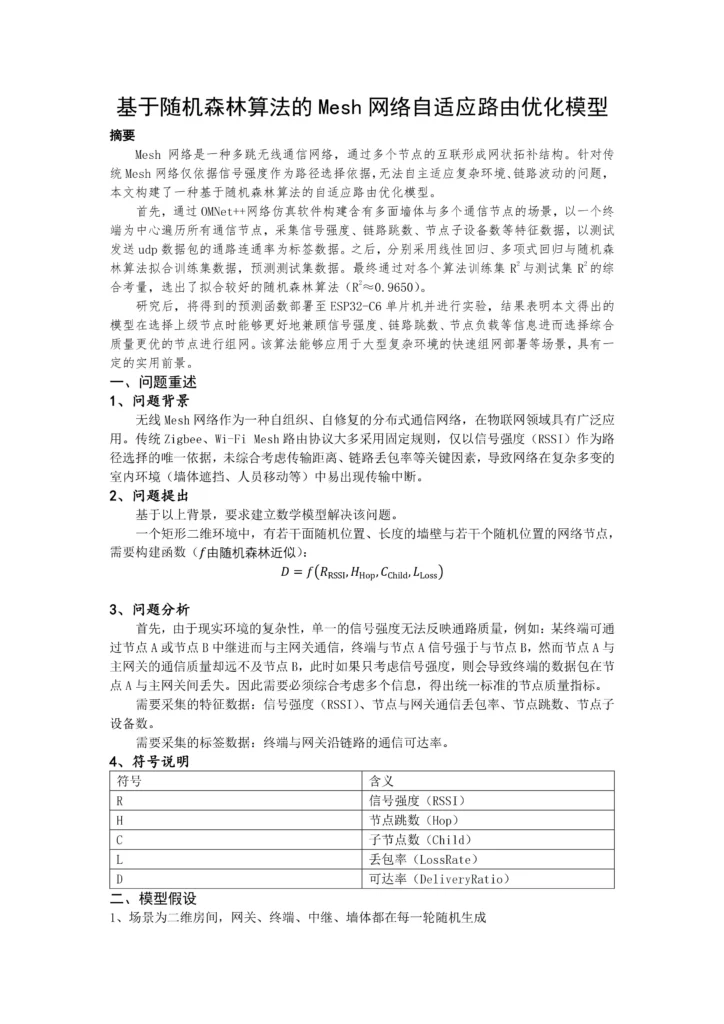
      <![CDATA[<h2 class="wp-block-heading" id="跳转-项目文档-研究日志">跳转：<a href="/archives/19/">项目文档&amp;研究日志</a></h2><figure class="wp-block-image size-large"><img src="/wp-content/uploads/2026/08/基于随机森林的Mesh网络自适应路由优化模型_page-0001-724x1024.webp" alt="" class="wp-image-40"/></figure><figure class="wp-block-image size-large"><img src="/wp-content/uploads/2026/08/基于随机森林的Mesh网络自适应路由优化模型_page-0002-724x1024.webp" alt="" class="wp-image-41"/></figure><figure class="wp-block-image size-large"><img src="/wp-content/uploads/2026/08/基于随机森林的Mesh网络自适应路由优化模型_page-0003-724x1024.webp" alt="" class="wp-image-42"/></figure><figure class="wp-block-image size-large"><img src="/wp-content/uploads/2026/08/基于随机森林的Mesh网络自适应路由优化模型_page-0004-724x1024.webp" alt="" class="wp-image-43"/></figure><section class="legacy-comments" id="comments"><h2 id="历史评论">历史评论（5）</h2><article id="comment-4" class="legacy-comment"><header><strong>pornip</strong> <time>2026-10-13 22:18:10</time></header><p>That was amazing</p></article><article id="comment-5" class="legacy-comment"><header><strong>555329</strong> <time>2026-10-15 22:49:58</time></header><p>Hi,how are you</p></article><article id="comment-6" class="legacy-comment"><header><strong>pornip</strong> <time>2026-10-18 22:59:29</time></header><p>Its Amazing</p></article><article id="comment-7" class="legacy-comment"><header><strong>www.555329.com</strong> <time>2026-10-24 03:37:10</time></header><p>If you are mad at me, just curse me out</p></article><article id="comment-8" class="legacy-comment"><header><strong>pornip.com</strong> <time>2026-10-28 20:22:39</time></header><p>HI,I AM HERE AGAIN AND AGAIN</p></article></section>]]>
    </content>
    <id>https://www.ycxhl.top/archives/25/</id>
    <link href="https://www.ycxhl.top/archives/25/"/>
    <published>2026-05-01T09:38:51.000Z</published>
    <summary>
      <![CDATA[跳转： 项目文档&研究日志]]>
    </summary>
    <title>[论文] 基于随机森林算法的Mesh网络自适应路由优化模型</title>
    <updated>2026-08-23T03:26:51.000Z</updated>
  </entry>
  <entry>
    <author>
      <name>Kazuki</name>
    </author>
    <category term="项目总览" scheme="https://www.ycxhl.top/categories/projects/"/>
    <content>
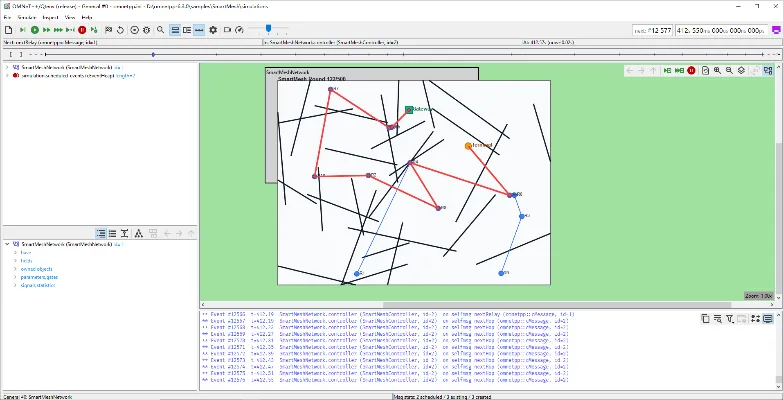
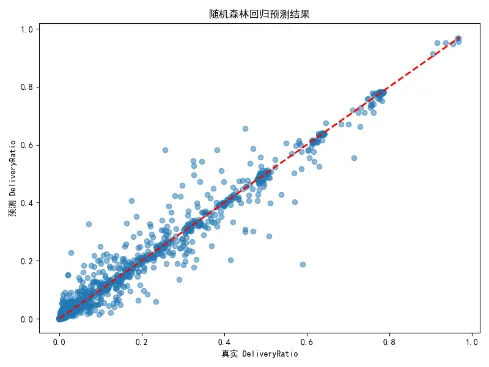
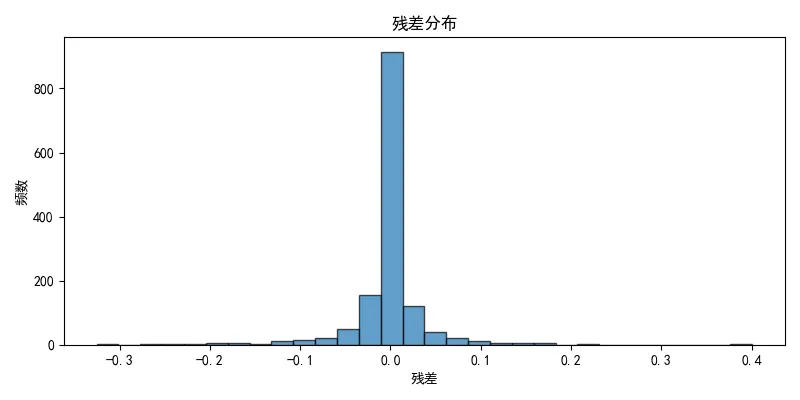
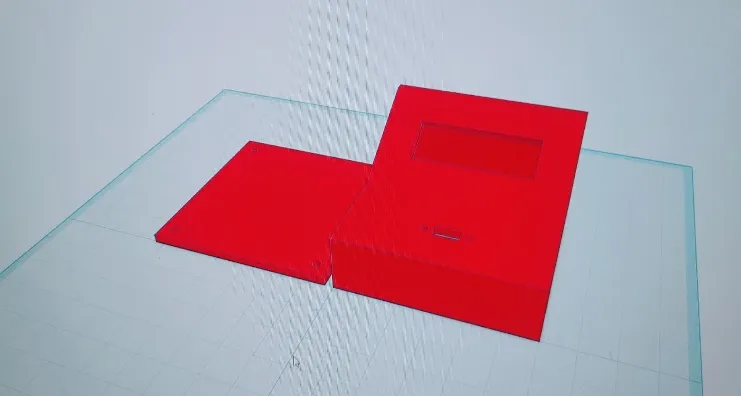
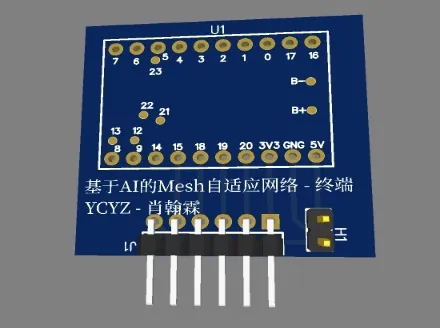
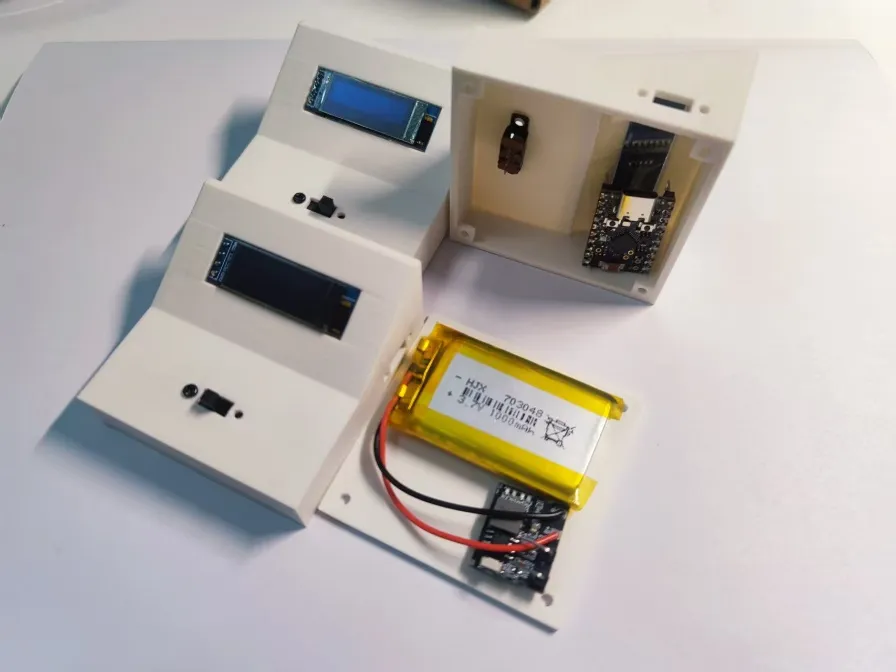
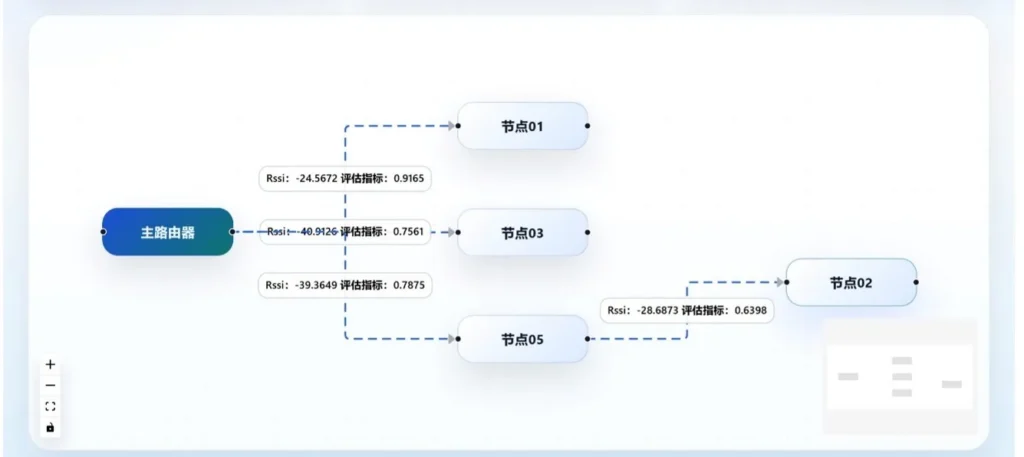
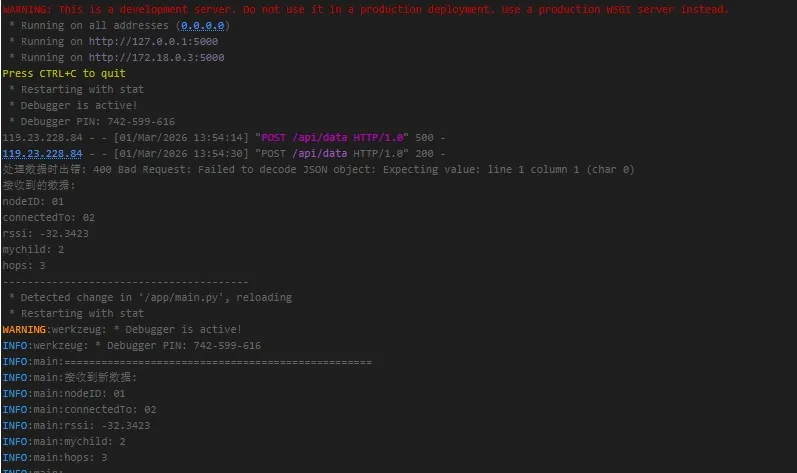
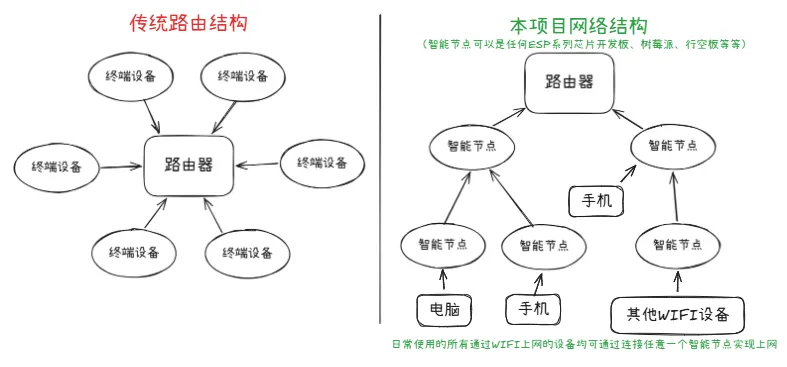
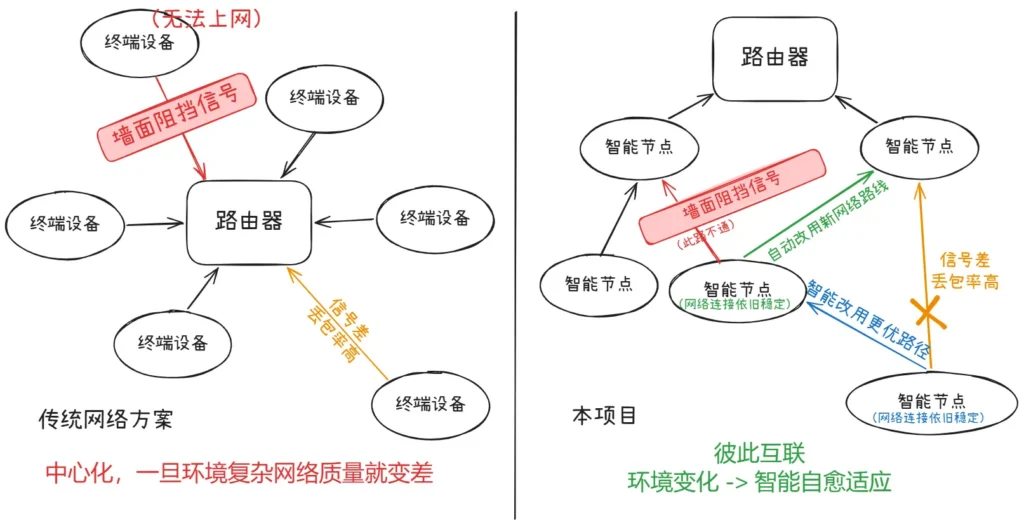
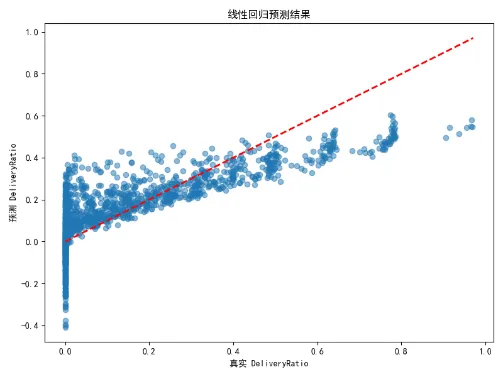
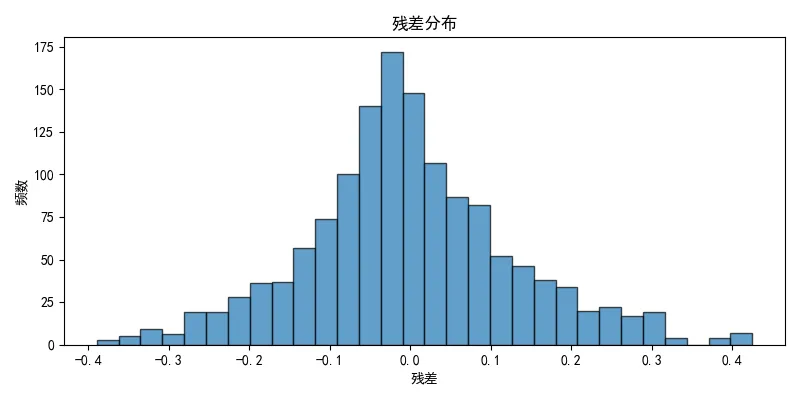
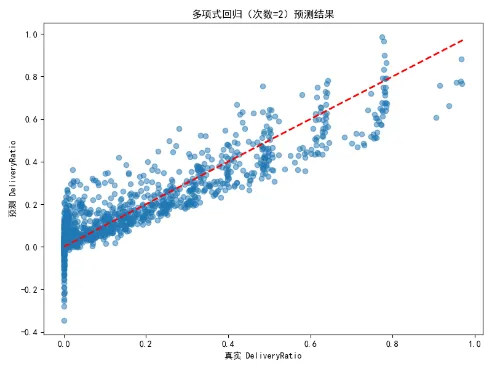
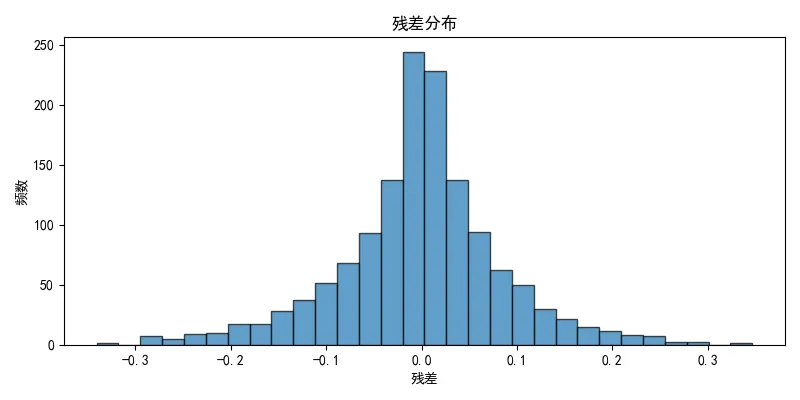
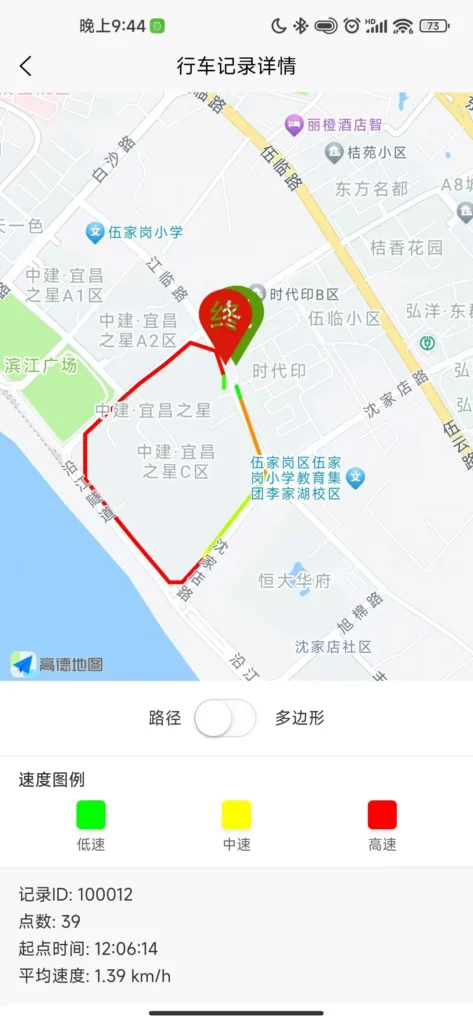
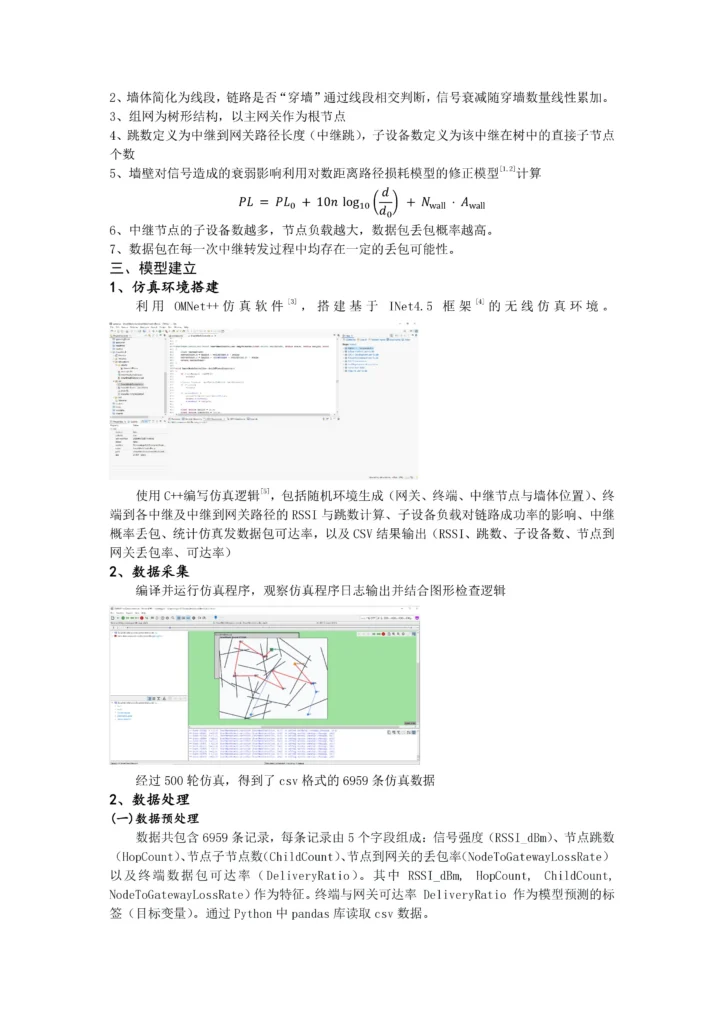
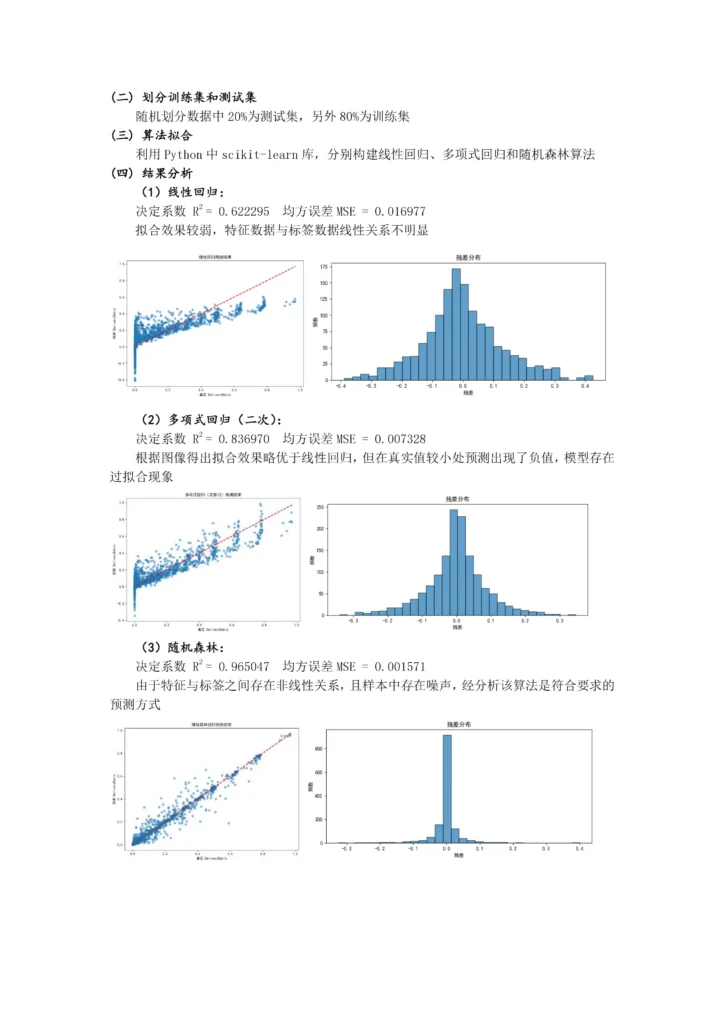
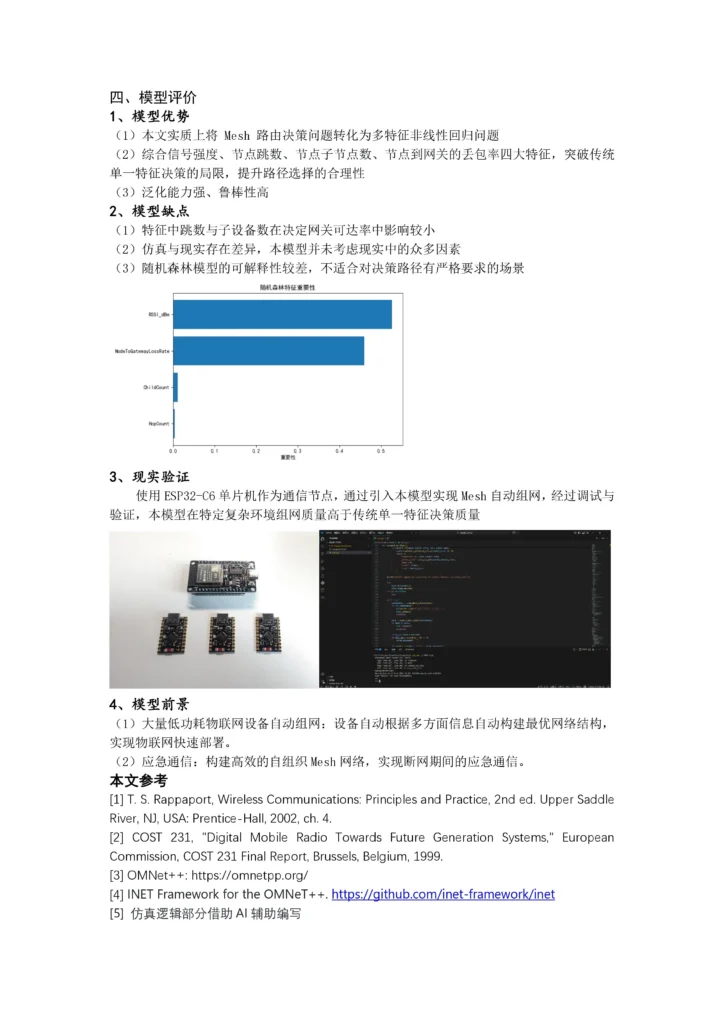
      <![CDATA[<h2 class="wp-block-heading" id="跳转-建模论文">跳转：<a href="/archives/25/">建模论文</a></h2><h1 class="wp-block-heading" id="项目文档-研究概述"><strong>项目文档&amp;研究概述</strong></h1><h1 class="wp-block-heading" id="一-研究背景">一、研究背景</h1><p>当前无线 Mesh 网络普遍存在“信号强却连接不稳定”的问题。传统 Zigbee、WIFI Mesh 等协议依赖单一信号强度因素进行路由选择，无法全面感知链路丢包率、物理遮挡及节点负载等关键因素。一旦遭遇墙体遮挡、人员移动等动态干扰，网络容易中断，不能适应变化/复杂的环境，难以满足特殊环境下的通信需求。<br>本项目改变了传统单一因素决策模式，搭建“AI 智能决策”架构。通过将随机森林算法部署至 ESP32-C6 芯片，赋予每个节点独立决策的能力，无需云端参与。系统融合信号质量、链路跳数、节点负载、链路稳定性等多维特征，实现从“被动连接”到“主动优化”的跨越，确保在复杂多变环境下网络依然稳健、高效、可自愈。</p><hr class="wp-block-separator has-alpha-channel-opacity"/><h1 class="wp-block-heading" id="二-项目概述">二、项目概述</h1><p>本项目构建了一种基于 AI 算法的自适应路由优化系统。<br>通过 OMNet++无线网络物理仿真软件构建含有若干墙体与通信节点的场景，获得了 6959 条仿真训练数据。之后，采用随机森林算法拟合训练集数据，得出了拟合效果较好的数学模型。<br>该模型可用函数近似表示（f 由随机森林近似）：</p><div class="wp-block-math has-medium-font-size"><math display="block"><semantics><mrow><mi>D</mi><mi>e</mi><mi>l</mi><mi>i</mi><mi>v</mi><mi>e</mi><mi>r</mi><mi>y</mi><mi>R</mi><mi>a</mi><mi>t</mi><mi>i</mi><mi>o</mi><mo>=</mo><mi>f</mi><mo form="prefix" stretchy="false">(</mo><mi>R</mi><mi>S</mi><mi>S</mi><mi>I</mi><mo separator="true">,</mo><mi>H</mi><mi>o</mi><mi>p</mi><mo separator="true">,</mo><mi>C</mi><mi>h</mi><mi>i</mi><mi>l</mi><mi>d</mi><mo separator="true">,</mo><mi>L</mi><mi>o</mi><mi>s</mi><mi>s</mi><mo form="postfix" stretchy="false">)</mo></mrow><annotation encoding="application/x-tex">DeliveryRatio = f(RSSI, Hop, Child, Loss)</annotation></semantics></math></div><p>研究后，将得到的预测算法部署至 ESP32-C6 单片机并进行实验，结果表明本文得出的模型在选择上级节点时能够更好地兼顾信号强度、链路跳数、节点负载等信息进而选择综合质量更优的节点进行组网。<br>该算法能够应用于大型复杂环境的快速组网部署等场景，具有一定的实用前景。</p><hr class="wp-block-separator has-alpha-channel-opacity"/><h1 class="wp-block-heading" id="三-核心亮点">三、核心亮点</h1><h2 class="wp-block-heading" id="1-多特征融合路由决策">1、多特征融合路由决策</h2><p>突破传统仅依赖信号强度的路由方式，综合 RSSI、传输距离、链路质量、能耗等多维特征，提升路径决策准确性。</p><h2 class="wp-block-heading" id="2-模块化智能组网">2、模块化智能组网</h2><p>每个 ESP32-C6 为一个独立的单元，单元之间彼此通信协商，通过训练的决策模型综合多方面实际数据推算节点质量指标，最终能够形成最优的拓补网络。<br>组网后，不论是 ESP32（C6/S3/C3/8266），还是手机、平板、电脑，都可以通过这些节点进行网络访问。此时这些节点起到了网络中继路由作用。</p><h2 class="wp-block-heading" id="3-训练基于机器学习的拟合预测模型">3、训练基于机器学习的拟合预测模型</h2><p>通过 OMNeT++无线物理仿真工具采集数据，使用随机森林训练路由选择模型，决定系数：</p><div class="wp-block-math has-medium-font-size"><math display="block"><semantics><mrow><msup><mrow><mi mathvariant="normal">R</mi></mrow><mn>2</mn></msup><mo>=</mo><mn>0.965047</mn><mo separator="true">,</mo><mrow><mtext></mtext><mi>MSE</mi></mrow><mo>=</mo><mn>0.001571</mn></mrow><annotation encoding="application/x-tex">\mathrm{R}^2 = 0.965047, \mathrm{MSE} = 0.001571</annotation></semantics></math></div><p>实现高精度路径质量预测。</p><figure class="wp-block-gallery has-nested-images columns-default is-cropped"><figure class="wp-block-image size-large"><img src="/wp-content/uploads/2026/08/OMNet仿真.webp" alt="" class="wp-image-74"/></figure><figure class="wp-block-image size-full"><img src="/wp-content/uploads/2026/08/随机森林1.webp" alt="" class="wp-image-51"/></figure><figure class="wp-block-image size-full"><img src="/wp-content/uploads/2026/08/随机森林2.webp" alt="" class="wp-image-52"/></figure></figure><h2 class="wp-block-heading" id="4-AI-边缘化部署">4、AI 边缘化部署</h2><p>将模型部署到 ESP32-C6 节点，实现本地实时推理，无需云端参与，提升模型决策响应速度与便捷性。</p><h2 class="wp-block-heading" id="5-3D-建模打印-PCB-设计">5、3D 建模打印 + PCB 设计</h2><p>将采用 3D 建模打印技术设计终端外壳，集成锂电池与充放电模块，通过将各个部件焊接到设计并打样的 PCB 电路板上，实现电路集成。</p><figure class="wp-block-gallery has-nested-images columns-default is-cropped"><figure class="wp-block-image size-large"><img src="/wp-content/uploads/2026/08/3D建模图.webp" alt="" class="wp-image-70"/></figure><figure class="wp-block-image size-large"><img src="/wp-content/uploads/2026/08/PCB设计图.webp" alt="" class="wp-image-75"/></figure><figure class="wp-block-image size-large"><img src="/wp-content/uploads/2026/08/实体成品图.webp" alt="" class="wp-image-49"/></figure></figure><h2 class="wp-block-heading" id="6-云端数据-结构实时监控">6、云端数据/结构实时监控</h2><p>结合 Python Flask 框架搭建服务端（后端），并将服务端通过 Docker 容器化部署于 Linux 云服务器（Debian-12.0），通过 Vue.JS 编写前端页面，实现网络拓补结构及节点信息的实时监控。</p><figure class="wp-block-gallery has-nested-images columns-default is-cropped"><figure class="wp-block-image size-large"><img src="/wp-content/uploads/2026/08/前端-1024x457.webp" alt="" class="wp-image-48"/></figure><figure class="wp-block-image size-large"><img src="/wp-content/uploads/2026/08/后端.webp" alt="" class="wp-image-39"/></figure></figure><hr class="wp-block-separator has-alpha-channel-opacity"/><h1 class="wp-block-heading" id="四-与传统网络连接方式的对比图解">四、与传统网络连接方式的对比图解</h1><h2 class="wp-block-heading" id="1-正常情况">1、正常情况</h2><figure class="wp-block-image size-full"><img src="/wp-content/uploads/2026/08/正常情况.webp" alt="" class="wp-image-63"/></figure><h2 class="wp-block-heading" id="2-可能遇到的意外情况-信号阻挡-或-距离远信号弱">2、可能遇到的意外情况（信号阻挡 或 距离远信号弱）</h2><figure class="wp-block-image size-large"><img src="/wp-content/uploads/2026/08/意外情况-1024x525.webp" alt="" class="wp-image-62"/></figure><p>对比图解 1，2：该创新方案优势明显，由于结合了训练的 AI 模型，在多变环境下本项目拥有自适应环境、自动优化网络拓补结构的能力，具备更强的适应性、灵活性、预见性。</p><hr class="wp-block-separator has-alpha-channel-opacity"/><h1 class="wp-block-heading" id="五-应用前景">五、应用前景</h1><ul class="wp-block-list"><li>灾害现场应急通信（无基站环境）</li><li>智慧物联网网络</li><li>工业低功耗监测网络</li><li>智能家居自组织网络</li></ul><hr class="wp-block-separator has-alpha-channel-opacity"/><h1 class="wp-block-heading" id="研究日志"><strong>研究日志</strong></h1><h1 class="wp-block-heading" id="一-选题">一：选题</h1><p><strong>现状：</strong><br>当前无线 Mesh 网络普遍存在“信号强却不稳定”的现象。<br><strong>问题所在：</strong><br>传统协议依赖单一信号强度进行路由选择，无法全面感知链路丢包率、物理遮挡及节点负载等关键因素。<br><strong>研究目标：</strong><br>搭建稳健、高效、可自愈的智能 Mesh 网络体系。</p><hr class="wp-block-separator has-alpha-channel-opacity"/><h1 class="wp-block-heading" id="二-仿真环境构建-数据采集">二：仿真环境构建、数据采集</h1><p>选用 OMNet++ 无线网络物理仿真软件构建场景。<br>仿真逻辑基于以下假设：</p><ol class="wp-block-list"><li>场景为二维房间，网关、终端、中继、墙体都在每一轮随机生成</li><li>墙体简化为线段，链路是否“穿墙”通过线段相交判断，信号衰减随穿墙数量线性累加。</li><li>组网为树形结构，以主网关作为根节点</li><li>跳数定义为中继到网关路径长度（中继跳），子设备数定义为该中继在树中的直接子节点个数</li><li>墙壁对信号造成的衰弱影响利用对数距离路径损耗模型的修正模型计算</li></ol><div class="wp-block-math has-medium-font-size"><math display="block"><semantics><mrow><mi>P</mi><mi>L</mi><mo>=</mo><mi>P</mi><msub><mi>L</mi><mn>0</mn></msub><mo>+</mo><mn>10</mn><mi>n</mi><mspace width="0.1667em"></mspace><msub><mi>log</mi><mn>10</mn></msub><mo>⁡</mo><mrow><mo fence="true" form="prefix">(</mo><mfrac><mi>d</mi><msub><mi>d</mi><mn>0</mn></msub></mfrac><mo fence="true" form="postfix">)</mo></mrow><mo>+</mo><msub><mi>N</mi><mtext>wall</mtext></msub><mo>⋅</mo><msub><mi>A</mi><mtext>wall</mtext></msub></mrow><annotation encoding="application/x-tex">PL = PL_0 + 10n \log_{10}\left(\frac{d}{d_0}\right) + N_{\text{wall}} \cdot A_{\text{wall}}</annotation></semantics></math></div><ol start="6" class="wp-block-list"><li>中继节点的子设备数越多，节点负载越大，数据包丢包概率越高。</li><li>数据包在每一次中继转发过程中均存在一定的丢包可能性。</li></ol><p>基于以上假设：<br>使用 C++ 编写仿真逻辑，包括随机环境生成（网关、终端、中继节点与墙体位置）、终端到各中继及中继到网关路径的 RSSI 与跳数计算、子设备负载对链路成功率的影响、中继概率丢包、统计仿真发数据包可达率，以及 CSV 结果输出（RSSI、跳数、子设备数、节点到网关丢包率、可达率）</p><hr class="wp-block-separator has-alpha-channel-opacity"/><h1 class="wp-block-heading" id="三-数据处理-AI-模型训练与优化">三：数据处理、AI 模型训练与优化</h1><h2 class="wp-block-heading" id="一-数据预处理">（一）数据预处理</h2><p>数据共包含 6959 条记录，每条记录由 5 个字段组成：</p><ul class="wp-block-list"><li>信号强度（RSSI_dBm）</li><li>节点跳数（HopCount）</li><li>节点子节点数（ChildCount）</li><li>节点到网关的丢包率（NodeToGatewayLossRate）</li><li>终端数据包可达率（DeliveryRatio）<br>其中 RSSI_dBm、HopCount、ChildCount、NodeToGatewayLossRate 作为特征。<br>终端与网关可达率 DeliveryRatio 作为模型预测的标签（目标变量）。<br>通过 Python 中 pandas 库读取 csv 数据。</li></ul><h2 class="wp-block-heading" id="二-划分训练集和测试集">（二）划分训练集和测试集</h2><p>随机划分数据中 20% 为测试集，另外 80% 为训练集。</p><h2 class="wp-block-heading" id="三-算法拟合">（三）算法拟合</h2><p>利用 Python 中 scikit-learn 库，分别构建线性回归、多项式回归和随机森林算法。</p><h2 class="wp-block-heading" id="四-结果分析">（四）结果分析</h2><h3 class="wp-block-heading" id="1-线性回归">（1）线性回归</h3><div class="wp-block-math has-medium-font-size"><math display="block"><semantics><mrow><msup><mrow><mi mathvariant="normal">R</mi></mrow><mn>2</mn></msup><mo>=</mo><mn>0.622295</mn><mo separator="true">,</mo><mrow><mtext></mtext><mi>MSE</mi></mrow><mo>=</mo><mn>0.016977</mn></mrow><annotation encoding="application/x-tex">\mathrm{R}^2 = 0.622295, \mathrm{MSE} = 0.016977</annotation></semantics></math></div><p>拟合效果较弱，特征数据与标签数据线性关系不明显。</p><figure class="wp-block-gallery has-nested-images columns-default is-cropped"><figure class="wp-block-image size-large"><img src="/wp-content/uploads/2026/08/线性回归1.webp" alt="" class="wp-image-60"/></figure><figure class="wp-block-image size-large"><img src="/wp-content/uploads/2026/08/线性回归2.webp" alt="" class="wp-image-61"/></figure></figure><h3 class="wp-block-heading" id="2-多项式回归-二次">（2）多项式回归（二次）</h3><p><br>根据图像得出拟合效果略优于线性回归，但在真实值较小处预测出现了负值，模型存在过拟合现象。</p><div class="wp-block-math has-medium-font-size"><math display="block"><semantics><mrow><msup><mrow><mi mathvariant="normal">R</mi></mrow><mn>2</mn></msup><mo>=</mo><mn>0.836970</mn><mo separator="true">,</mo><mrow><mtext></mtext><mi>MSE</mi></mrow><mo>=</mo><mn>0.007328</mn></mrow><annotation encoding="application/x-tex">\mathrm{R}^2 = 0.836970, \mathrm{MSE} = 0.007328</annotation></semantics></math></div><figure class="wp-block-gallery has-nested-images columns-default is-cropped"><figure class="wp-block-image size-large"><img src="/wp-content/uploads/2026/08/多项式回归1.webp" alt="" class="wp-image-76"/></figure><figure class="wp-block-image size-large"><img src="/wp-content/uploads/2026/08/多项式回归2.webp" alt="" class="wp-image-38"/></figure></figure><h3 class="wp-block-heading" id="3-随机森林">（3）随机森林</h3><p><br>由于特征与标签之间存在非线性关系，且样本中存在噪声，经分析该算法是符合要求的预测方式。</p><div class="wp-block-math has-medium-font-size"><math display="block"><semantics><mrow><msup><mrow><mi mathvariant="normal">R</mi></mrow><mn>2</mn></msup><mo>=</mo><mn>0.965047</mn><mo separator="true">,</mo><mrow><mtext></mtext><mi>MSE</mi></mrow><mo>=</mo><mn>0.001571</mn></mrow><annotation encoding="application/x-tex">\mathrm{R}^2 = 0.965047, \mathrm{MSE} = 0.001571</annotation></semantics></math></div><figure class="wp-block-gallery has-nested-images columns-default is-cropped"><figure class="wp-block-image size-large"><img src="/wp-content/uploads/2026/08/随机森林1.webp" alt="" class="wp-image-51"/></figure><figure class="wp-block-image size-large"><img src="/wp-content/uploads/2026/08/随机森林2.webp" alt="" class="wp-image-52"/></figure></figure><hr class="wp-block-separator has-alpha-channel-opacity"/><h1 class="wp-block-heading" id="四-硬件开发与部署">四：硬件开发与部署</h1><p><strong>核心：</strong><br>选定 ESP32-C6 单片机作为核心控制单元。将训练好的预测算法部署至 ESP32-C6 节点。完善基本逻辑。<br><strong>结构：</strong><br>采用 3D 建模打印技术设计终端外壳。完成 PCB 电路板设计与打样。<br><strong>功能：</strong><br>集成锂电池与充放电模块，开关，OLED 屏幕。<br><strong>组网能力：</strong><br>每个 ESP32-C6 为独立单元，彼此通信协商，形成最优拓扑网络。<br>兼容 ESP32 系列（C6/S3/C3/8266）及手机、平板、电脑等终端接入。</p><figure class="wp-block-gallery has-nested-images columns-default is-cropped"><figure class="wp-block-image size-large"><img src="/wp-content/uploads/2026/08/3D建模图.webp" alt="" class="wp-image-70"/></figure><figure class="wp-block-image size-large"><img src="/wp-content/uploads/2026/08/PCB设计图.webp" alt="" class="wp-image-75"/></figure><figure class="wp-block-image size-large"><img src="/wp-content/uploads/2026/08/实体成品图.webp" alt="" class="wp-image-49"/></figure></figure><hr class="wp-block-separator has-alpha-channel-opacity"/><h1 class="wp-block-heading" id="五-云端监控系统搭建">五：云端监控系统搭建</h1><p><strong>后端：</strong><br>结合 Python Flask 框架搭建服务端。<br>通过 Docker 容器化部署于 Linux 云服务器（Debian-12.0）。<br><strong>前端：</strong><br>使用 Vue.JS 编写前端页面。<br>实现了网络拓扑结构及节点信息的实时监控（包括节点编号、子设备数、丢包率、RSSI 等数据展示）。<br>后端日志可实时记录数据接收情况（如 POST /api/data 请求处理）。</p><figure class="wp-block-gallery has-nested-images columns-default is-cropped"><figure class="wp-block-image size-large"><img src="/wp-content/uploads/2026/08/前端-1024x457.webp" alt="" class="wp-image-48"/></figure><figure class="wp-block-image size-large"><img src="/wp-content/uploads/2026/08/后端.webp" alt="" class="wp-image-39"/></figure></figure><hr class="wp-block-separator has-alpha-channel-opacity"/><h1 class="wp-block-heading" id="六-优化系统-修复问题">六：优化系统、修复问题</h1><p>整理各部分程序，查找并修复逻辑和细节错误，优化系统，同时增加一些有意义的功能。</p>]]>
    </content>
    <id>https://www.ycxhl.top/archives/19/</id>
    <link href="https://www.ycxhl.top/archives/19/"/>
    <published>2026-05-01T09:38:02.000Z</published>
    <summary>
      <![CDATA[跳转： 建模论文 项目文档&研究概述 一、研究背景 当前无线 Mesh 网络普遍存在“信号强却连接不稳定”的问题。传统 Zigbee、WIFI Mesh 等协议依赖单一信号强度因素进行路由选择，无法全面感知链路丢包率、物理遮挡及节点负载等关键因素。一旦遭遇墙体遮挡、人员移动等动态干扰，网络容易中断，不能适应变化/复杂的环境，难以满足特殊环境下的通信需求。 本]]>
    </summary>
    <title>[项目] 基于自训练AI的Mesh自适应路由优化系统研究</title>
    <updated>2026-08-23T03:26:59.000Z</updated>
  </entry>
  <entry>
    <author>
      <name>Kazuki</name>
    </author>
    <category term="项目总览" scheme="https://www.ycxhl.top/categories/projects/"/>
    <content>
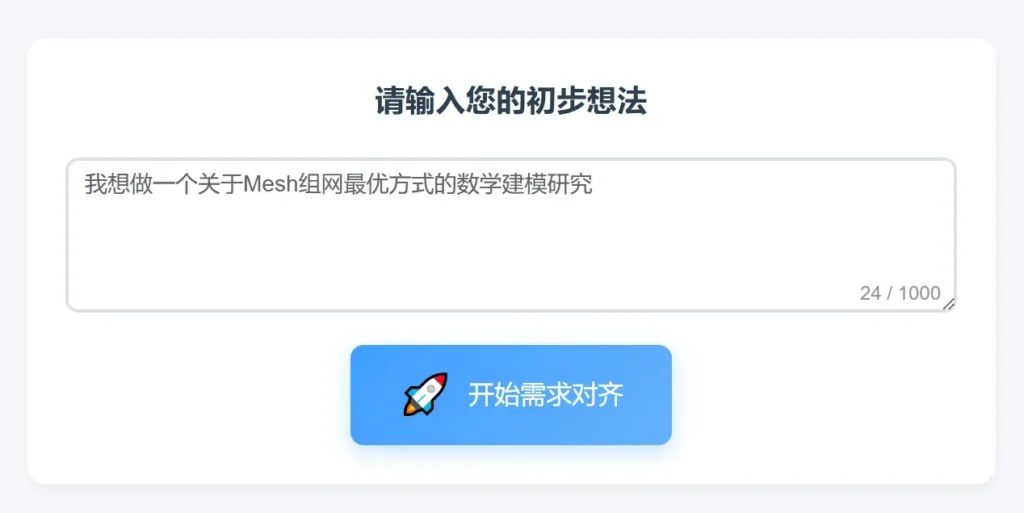
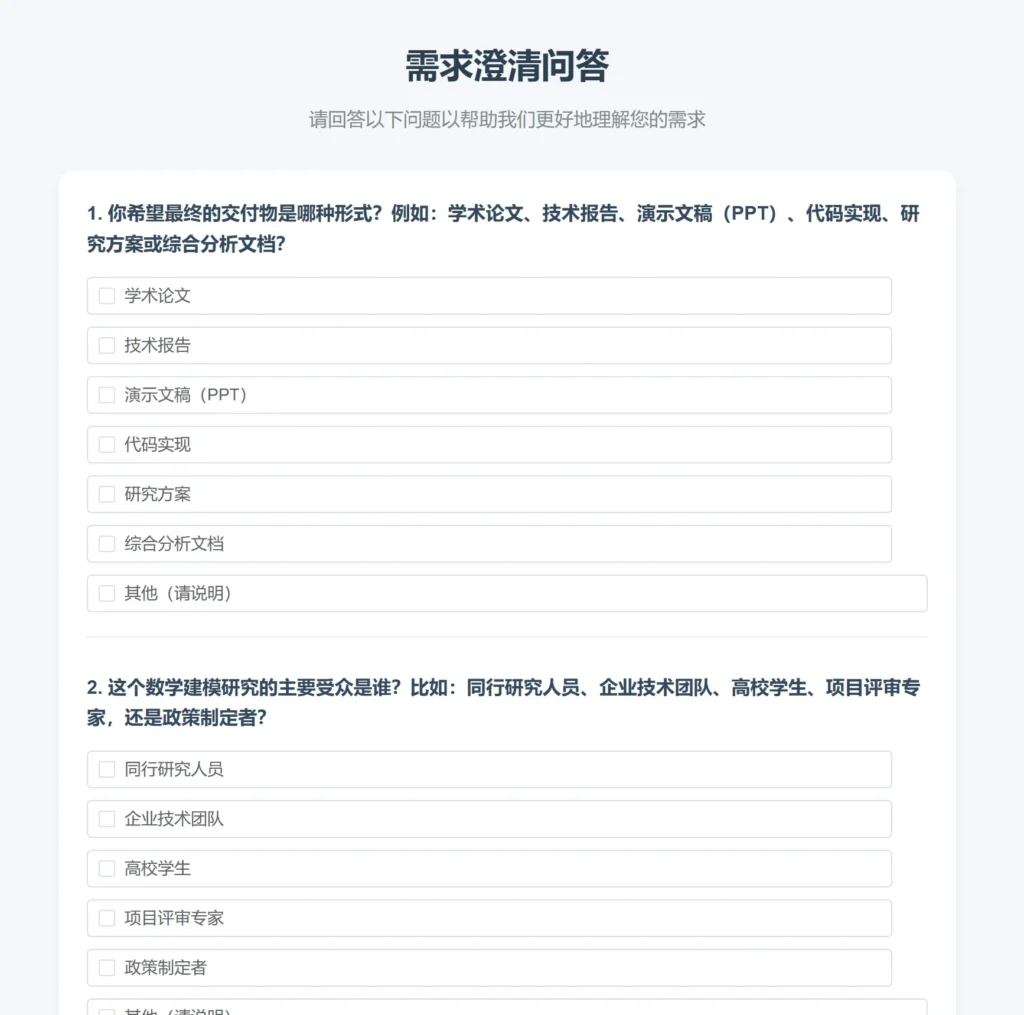
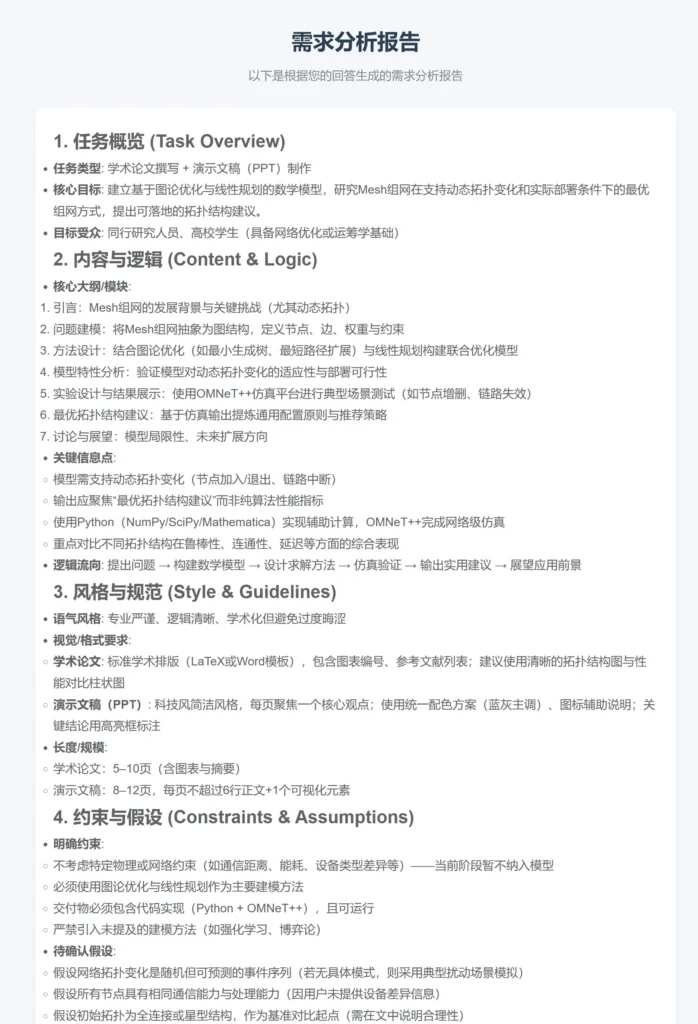
      <![CDATA[<blockquote class="wp-block-quote"><p>当你在用AI生成代码、方案或内容时，是否常遇到这样的场景：<br>你写了一长串需求，AI却给出了完全跑偏的答案；<br>你反复修改提示词，但生成结果始终“差点意思”；<br>你觉得自己说清楚了，但AI理解的是另一个版本……</p><p>这不是AI不够聪明，而是你的需求还不够“结构化”。<br><strong>ClarityAI</strong> 正是为此而生——它通过多轮智能问答，帮你把零散的想法梳理成一份逻辑清晰、细节完备的需求报告，让下游任何AI都能精准理解你的意图。</p></blockquote><h2 class="wp-block-heading" id="使用说明">使用说明：</h2><p>我在自己的服务器上部署了后端，可以直接访问使用：<a href="https://clarity.ycxhl.top">链接直达ClarityAI</a><br>由于资金有限，我设置了单日token使用限额，如达到限额，请在<strong>“设置”</strong>中填写自己的API BaseURL和API-Key</p><h3 class="wp-block-heading" id="使用示例">使用示例</h3><figure class="wp-block-gallery has-nested-images columns-default is-cropped"><figure class="wp-block-image size-large"><img src="/wp-content/uploads/2026/08/ClarityAI-1-1024x513.webp" alt="" class="wp-image-71"/></figure><figure class="wp-block-image size-large"><img src="/wp-content/uploads/2026/08/ClarityAI-2-1024x1015.webp" alt="" class="wp-image-72"/></figure><figure class="wp-block-image size-large"><img src="/wp-content/uploads/2026/08/ClarityAI-3-698x1024.webp" alt="" class="wp-image-73"/></figure></figure><h2 class="wp-block-heading" id="一-痛点-用户与AI之间的-代沟">一、痛点：用户与AI之间的“代沟”</h2><p>我们正处在AI应用爆发期，从代码生成、文案创作到产品设计，人人都想借助AI提高效率。但一个普遍存在的误区是：<strong>我们常常高估了自己表达需求的能力，也低估了AI准确理解模糊语言的门槛。</strong></p><ul class="wp-block-list"><li>你说“做一个类似小红书但更简洁的App”，AI可能理解为“去掉部分功能”，但你对“简洁”的定义是“极简设计风格、只保留图文分享”；</li><li>你说“用Python写个爬虫”，AI给了你一个通用框架，但你忘了说明需要处理反爬、需要存储到数据库、需要定时执行；</li><li>你说“生成一份市场分析报告”，AI按模板输出，但你没说清楚目标受众是投资人还是内部团队，导致报告侧重点完全错误。</li></ul><p>结果就是：<strong>AI输出的内容不符合预期 → 反复修改提示词 → 耗费大量时间 → 最终可能还是手动重写</strong>。这不是AI能力不行，而是我们缺少一个<strong>把模糊需求转化为精确指令</strong>的中间层。</p><p><strong>ClarityAI 的角色就是这一中间层</strong>。它不直接生成最终产品，而是通过系统化提问，引导你一步步补充功能边界、技术约束、用户场景、优先级等关键信息，最终输出一份<strong>结构化的需求报告</strong>。这份报告可以直接喂给任何下游AI（如ChatGPT、Claude、Copilot、Midjourney等），让它们基于完整的上下文给出更贴合你初衷的结果。</p><h2 class="wp-block-heading" id="二-产品定位-需求报告的生成器-而非最终产出物">二、产品定位：需求报告的生成器，而非最终产出物</h2><p>ClarityAI 的核心价值不是替代AI，而是<strong>增强你与AI之间的沟通效率</strong>。它像一位专业的需求分析师，帮你把脑子里“一团乱麻”的想法梳理成清晰条理的需求文档。</p><ul class="wp-block-list"><li><strong>输入</strong>：一句简单的想法（例如：“我想做一个帮助用户记账的微信小程序”）</li><li><strong>过程</strong>：多轮动态问答（覆盖用户画像、功能列表、技术选型、数据隐私、迭代计划等维度）</li><li><strong>输出</strong>：一份Markdown格式的详细需求报告，包含背景、目标、功能描述、非功能需求、验收标准等章节<br>这份报告可以直接粘贴到对话窗口，作为高级提示词发给任意AI，让其生成代码、设计稿、方案或文案；也可以作为团队内部的需求规格书，用于后续开发。</li></ul><h2 class="wp-block-heading" id="三-技术架构-Vue-3-Flask-轻量而高效">三、技术架构：Vue 3 + Flask，轻量而高效</h2><p>项目采用前后端分离架构，代码仓库分置，便于独立部署和扩展。</p><h3 class="wp-block-heading" id="前端-ClarityAI-Frontend">前端 —— ClarityAI-Frontend</h3><p>基于 <strong>Vue 3 + Vite + Element Plus</strong>，注重交互流畅性和界面清晰度：</p><ul class="wp-block-list"><li>核心依赖：Vue 3.5.27、Vite 7.3.1、Element Plus 2.7.7、Pinia 3.0.4、Vue Router 5.0.1</li><li>Markdown 渲染使用 <code>markdown-it</code>，结果页清晰展示报告</li><li>主要页面：</li><li><strong>首页</strong>：输入初步想法，一键启动需求澄清流程</li><li><strong>问答页</strong>：展示AI动态生成的问题（单选/填空/论述），逐题作答</li><li><strong>结果页</strong>：渲染完整需求报告，支持下载Markdown，并生成分享链接</li><li><strong>总览页</strong>：以时间线展示整个对话和报告版本，方便回溯</li></ul><h3 class="wp-block-heading" id="后端-ClarityAI-Backend">后端 —— ClarityAI-Backend</h3><p>基于 <strong>Flask 3.0.3</strong>，提供RESTful API，并集成Qwen（通义千问）或OpenAI作为智能引擎：</p><ul class="wp-block-list"><li>数据库：SQLite（轻量，开箱即用）</li><li>AI接口：支持动态生成问题、基于答案继续追问、汇总生成最终报告</li><li>安全与成本控制：支持Token每日限额配置，避免API费用超支</li></ul><p>主要API端点：</p><pre class="wp-block-code"><code>GET  /api/health                     # 服务状态POST /api/generate-questions         # 根据初始想法生成问卷GET  /api/session/&lt;id&gt;               # 获取会话所有数据POST /api/submit-answers             # 提交当前轮答案POST /api/continue-with-feedback     # 继续追问细化POST /api/generate-pdf               # 生成PDF报告GET  /api/download-pdf/&lt;id&gt;          # 下载PDFDELETE /api/session/&lt;id&gt;             # 删除会话</code></pre><h2 class="wp-block-heading" id="四-核心流程-三步生成高质量需求报告">四、核心流程：三步生成高质量需求报告</h2><h3 class="wp-block-heading" id="第一步-输入你的原始想法">第一步：输入你的原始想法</h3><p>在首页输入框中写下你最粗颗粒的想法，哪怕只有一句话也可以。例如：“我想做一个在线教育平台”。</p><h3 class="wp-block-heading" id="第二步-AI引导式问答">第二步：AI引导式问答</h3><p>后端AI会根据你的输入，自动生成一组结构清晰的问题，可能会根据你的想法涵盖：</p><ul class="wp-block-list"><li><strong>目标用户</strong>：谁会用？他们的痛点是什么？</li><li><strong>核心功能</strong>：必须有的功能和锦上添花的功能？</li><li><strong>技术偏好</strong>：有指定技术栈吗？有无性能要求？</li><li><strong>资源约束</strong>：时间、预算、团队规模？</li><li><strong>成功标准</strong>：如何衡量最终成果是否达标？<br>问题形式包括单/多选题、填空题和开放式叙述题。你回答完一轮后，还可以选择“继续细化”，AI会根据已有答案再生成更深层的问题，直到你觉得需求已经足够清晰为止。</li></ul><h3 class="wp-block-heading" id="第三步-生成需求报告并用于下游AI">第三步：生成需求报告并用于下游AI</h3><p>所有问答完成后，后端会自动汇总所有信息，生成一份结构化的Markdown报告。报告包含以下典型章节：</p><ol class="wp-block-list"><li><strong>项目概述</strong>（背景、目标）</li><li><strong>用户角色与场景</strong>（谁在什么情况下使用）</li><li><strong>功能需求</strong>（优先级分级）</li><li><strong>非功能需求</strong>（性能、安全、兼容性）</li><li><strong>技术约束与依赖</strong></li><li><strong>验收标准</strong><br>你可以在结果页直接复制这份报告，粘贴到其他AI工具的对话框，作为超级提示词（Super Prompt）。例如，复制报告内容发送给代码生成AI，它会基于完整的需求描述生成更准确的代码骨架；发送给设计AI，它会产出风格更匹配的设计稿。</li></ol><h2 class="wp-block-heading" id="五-快速本地部署">五、快速本地部署</h2><pre class="wp-block-code"><code># 后端git clone https://github.com/kazuky233/ClarityAI-Backend.gitcd ClarityAI-Backendpython -m venv .venvsource .venv/bin/activate  # Windows: .venv\Scripts\activatepip install -r requirements.txt# 配置 .env 文件，填写 QWEN_API_KEY（或 OPENAI_API_KEY）python run.py# 前端git clone https://github.com/kazuky233/ClarityAI-Frontend.gitcd ClarityAI-Frontendnpm inpm run dev</code></pre><p>访问 <code>http://localhost:5173</code> 即可体验。</p><h2 class="wp-block-heading" id="六-使用场景">六、使用场景</h2><ul class="wp-block-list"><li><strong>个人开发者</strong>：用AI辅助生成项目代码前，先用ClarityAI理清需求</li><li><strong>产品经理</strong>：快速产出需求文档初稿，作为团队讨论的基础</li><li><strong>创业者</strong>：将自己的商业想法转化为可执行的规格说明</li><li><strong>AI重度用户</strong>：通过高质量需求报告，减少与AI的反复拉扯</li></ul><h2 class="wp-block-heading" id="结语">结语</h2><p>ClarityAI 不试图替代任何AI，而是为AI“指路”。在AI能力日益强大的今天，<strong>清晰的输入比复杂的提示词技巧更重要</strong>。通过将模糊想法转化为结构化需求，ClarityAI 让你与任何下游AI的对话都变得更高效、更精准。<br>如果你也曾因需求没说清楚而让AI“翻车”，不妨试试 ClarityAI。欢迎访问GitHub仓库，点个Star，也期待你的Issue！</p><ul class="wp-block-list"><li><strong>前端</strong>：<a href="https://github.com/kazuky233/ClarityAI-Frontend">kazuky233/ClarityAI-Frontend</a></li><li><strong>后端</strong>：<a href="https://github.com/kazuky233/ClarityAI-Backend">kazuky233/ClarityAI-Backend</a></li></ul>]]>
    </content>
    <id>https://www.ycxhl.top/archives/20/</id>
    <link href="https://www.ycxhl.top/archives/20/"/>
    <published>2026-02-28T09:38:25.000Z</published>
    <summary>当你在用AI生成代码、方案或内容时，是否常遇到这样的场景： 你写了一长串需求，AI却给出了完全跑偏的答案； 你反复修改提示词，但生成结果始终“差点意思”； 你觉得自己说清楚了，但AI理解的是另一个版本…… 这不是AI不够聪明，而是你的需求还不够“结构化”。 ClarityAI 正是为此而生——它通过多轮智能问答，帮你把零散的想法梳理成一份逻辑清晰、细节完备的</summary>
    <title>[项目] ClarityAI 智能需求对齐工具</title>
    <updated>2026-08-23T03:27:06.000Z</updated>
  </entry>
  <entry>
    <author>
      <name>Kazuki</name>
    </author>
    <category term="项目总览" scheme="https://www.ycxhl.top/categories/projects/"/>
    <content>
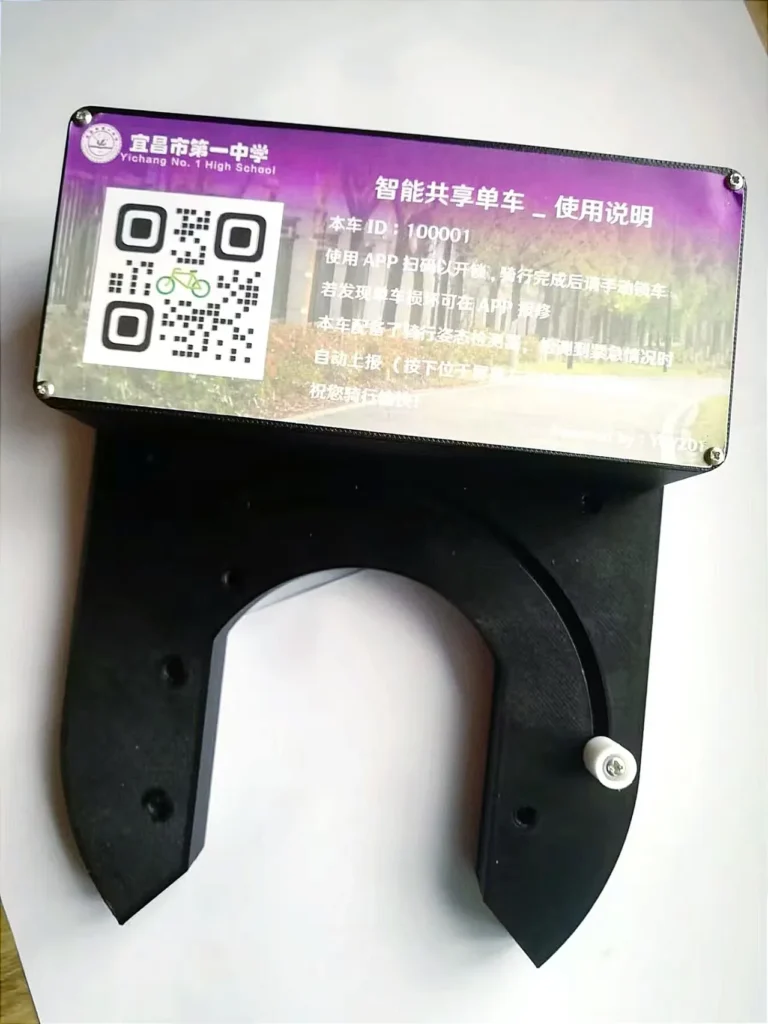
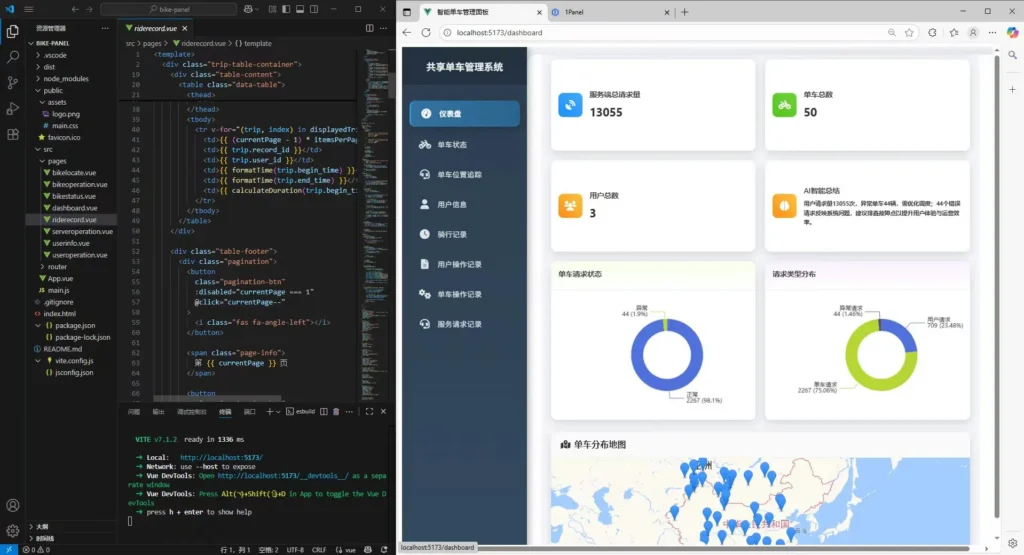
      <![CDATA[<blockquote class="wp-block-quote"><p><strong>一套覆盖用户APP、智能车锁、管理后台的完整共享单车解决方案，技术栈全面，实测抗压 89.7 次/秒</strong></p></blockquote><h2 class="wp-block-heading" id="项目缘起">项目缘起</h2><p>为了参加2025全国青少年信息素养大赛总决赛，我们按照给定题目要求完成了基本开关锁功能，但为了更贴近生活、做成完整成熟的产品，我们开发了更多分支及创新功能，包括但不限于：<strong>GPS定位、事故检测报警、车辆故障上报、车辆数据集群管理、后台管理大屏、以用户为单位的数据管理、行程数据记录展示</strong>。涵盖<strong>用户端APP、嵌入式智能锁、后台管理系统以及API服务</strong>。<br>本文将深入解析这套系统的技术架构与实现亮点。</p><h2 class="wp-block-heading" id="团队分工">团队分工</h2><figure class="wp-block-table"><table class="has-fixed-layout"><tbody><tr><td>我(XHL)</td><td>服务器运维、前后端搭建、APP、全部软件部分等</td><td><a href="/">个人网站</a></td></tr><tr><td>The Sandy</td><td>车锁3D结构设计与打印、硬件结构构建、协助完成ESP32程序开发等</td><td><a href="https://decades.top">个人网站</a></td></tr></tbody></table></figure><h2 class="wp-block-heading" id="一-整体架构-分层设计">一、整体架构：分层设计</h2><p>项目三层架构：</p><figure class="wp-block-table"><table class="has-fixed-layout"><thead><tr><th>层级</th><th>技术栈</th><th>功能</th></tr></thead><tbody><tr><td>客户端</td><td>Vue + Android + 高德地图 SDK</td><td>地图展示、扫码开锁、行程记录、用户中心</td></tr><tr><td>单车端</td><td>MicroPython + ESP32 + GPS/MPU6050</td><td>定位上报、姿态检测、开锁执行</td></tr><tr><td>API 服务</td><td>Python Flask</td><td>业务逻辑处理、数据接口</td></tr><tr><td>数据层</td><td>MySQL + 连接池</td><td>数据存储</td></tr><tr><td>基础设施</td><td>Docker + Nginx + Debian</td><td>容器化部署、负载均衡</td></tr></tbody></table></figure><figure class="wp-block-image size-large"><img src="/wp-content/uploads/2026/08/智能共享单车-1-768x1024.webp" alt="" class="wp-image-64"/></figure><h2 class="wp-block-heading" id="二-服务端亮点-高性能与高可用">二、服务端亮点：高性能与高可用</h2><h3 class="wp-block-heading" id="2-1-连接池设计">2.1 连接池设计</h3><p>服务端基于 Python Flask 开发，数据库方面我自己封装了 <code>SQL</code> 类</p><pre class="wp-block-code"><code>from dbutils.pooled_db import PooledDBclass SQL:    def __init__(self, db_address, db_username, db_passwd, db_name):        self.pool = PooledDB(            creator=pymysql,            maxconnections=10,            host=db_address,            user=db_username,            password=db_passwd,            database=db_name        )</code></pre><p><strong>实测数据</strong>：系统可承受约 <strong>89次/秒</strong> 的数据请求，在网络攻击测试中服务端从未崩溃。</p><h3 class="wp-block-heading" id="2-2-日志系统">2.2 日志系统</h3><p>所有 API 请求都会通过 <code>server_log()</code> 函数记录到数据库，日志类型分为：</p><ul class="wp-block-list"><li><strong>USER</strong>：用户登录、注册、查询等操作</li><li><strong>BIKE</strong>：单车解锁、锁车、位置更新</li><li><strong>ACCI</strong>：事故报警、防盗报警</li><li><strong>MAIN</strong>：报修、维修完成</li><li><strong>PANEL</strong>：后台数据访问<br>这不仅便于问题追溯，也为数据分析和运营决策提供了基础。</li></ul><h3 class="wp-block-heading" id="2-3-钉钉告警集成">2.3 钉钉告警集成</h3><p>事故报警和防盗报警会通过钉钉机器人实时推送：</p><figure class="wp-block-gallery has-nested-images columns-default is-cropped"><figure class="wp-block-image size-large"><img src="/wp-content/uploads/2026/08/智能共享单车-2-473x1024.webp" alt="" class="wp-image-65"/></figure><figure class="wp-block-image size-large"><img src="/wp-content/uploads/2026/08/智能共享单车-3-473x1024.webp" alt="" class="wp-image-66"/></figure><figure class="wp-block-image size-large"><img src="/wp-content/uploads/2026/08/智能共享单车-4-473x1024.webp" alt="" class="wp-image-67"/></figure></figure><h2 class="wp-block-heading" id="三-智能车锁-硬件与算法的结合">三、智能车锁：硬件与算法的结合</h2><h3 class="wp-block-heading" id="3-1-机械结构迭代">3.1 机械结构迭代</h3><blockquote class="wp-block-quote"><p>建模设计与3D打印部分由The Sandy完成（<a href="https://114514.com.cn/">个人网站</a>）</p></blockquote><p>外壳经历了五代迭代：</p><figure class="wp-block-table"><table class="has-fixed-layout"><thead><tr><th>版本</th><th>材料</th><th>改进点</th></tr></thead><tbody><tr><td>初代</td><td>PLA</td><td>验证基础结构可行性</td></tr><tr><td>二代</td><td>PLA</td><td>优化润滑油方案</td></tr><tr><td>三代</td><td>PLA</td><td>固定方案优化</td></tr><tr><td>四代</td><td>PETG-CF</td><td>强度大幅提升</td></tr><tr><td>四+代</td><td>PETG-CF + PETG 开窗</td><td>解决 GPS 信号屏蔽问题</td></tr></tbody></table></figure><blockquote class="wp-block-quote"><p><strong>技术细节</strong>：碳纤维增强 PETG 会屏蔽 GPS 信号，因此天线区域专门采用 PETG 开窗设计。</p></blockquote><h3 class="wp-block-heading" id="3-2-姿态检测与事故报警">3.2 姿态检测与事故报警</h3><p>使用 MPU6050 六轴传感器实时检测车辆姿态。当检测到异常冲击（如摔车），系统会：</p><ol class="wp-block-list"><li>通过 OLED 屏幕弹出提示，给用户 <strong>10 秒取消时间</strong>（防止误报）</li><li>确认后调用 <code>/bike/accident</code> 接口</li><li>服务端查询用户预留的紧急联系人</li><li>钉钉机器人自动推送事故位置和用户信息</li></ol><h3 class="wp-block-heading" id="3-3-电源管理与光伏充电">3.3 电源管理与光伏充电</h3><pre class="wp-block-code"><code>太阳能板 → 充电IC → 7.4V锂电池                      ↓               DC-DC降压 → 5.06V → ESP32                      ↓               继电器直连 → 电磁铁（大电流）</code></pre><ul class="wp-block-list"><li><strong>光伏充电</strong>：6V 3W 太阳能板持续补电</li><li><strong>低功耗策略</strong>：GPS 无数据时自动重试，干簧管异常触发三次重试后上报故障</li></ul><h2 class="wp-block-heading" id="四-后台管理系统-数据可视化">四、后台管理系统：数据可视化</h2><figure class="wp-block-image size-large"><img src="/wp-content/uploads/2026/08/智能共享单车-5-1024x555.webp" alt="" class="wp-image-68"/></figure><p>后台采用 <strong>Vue3 + ECharts + 高德地图API</strong> 构建，功能包括：</p><ul class="wp-block-list"><li><strong>仪表盘</strong>：单车总数、用户总数、请求总量实时刷新</li><li><strong>单车位置追踪</strong>：地图上实时显示所有车辆分布</li><li><strong>用户管理</strong>：查看所有用户信息及操作记录</li><li><strong>骑行记录</strong>：订单详情、轨迹回放</li><li><strong>维修管理</strong>：报修/修复状态流转</li><li><strong>日志审计</strong>：服务端日志、单车日志、用户日志全量查询</li></ul><h2 class="wp-block-heading" id="五-API-接口设计规范">五、API 接口设计规范</h2><h3 class="wp-block-heading" id="客户端接口示例">客户端接口示例</h3><figure class="wp-block-table"><table class="has-fixed-layout"><thead><tr><th>接口</th><th>路径</th><th>说明</th></tr></thead><tbody><tr><td>用户登录</td><td>POST /client/login</td><td>返回昵称和状态</td></tr><tr><td>附近单车</td><td>POST /client/nearby</td><td>经纬度范围查询</td></tr><tr><td>解锁单车</td><td>POST /client/unlock</td><td>创建骑行记录</td></tr><tr><td>获取记录</td><td>POST /client/getrecord</td><td>历史订单</td></tr></tbody></table></figure><h3 class="wp-block-heading" id="单车设备接口">单车设备接口</h3><figure class="wp-block-table"><table class="has-fixed-layout"><thead><tr><th>接口</th><th>路径</th><th>说明</th></tr></thead><tbody><tr><td>状态检查</td><td>POST /bike/check</td><td>返回 lock/unlock</td></tr><tr><td>位置更新</td><td>POST /bike/update</td><td>实时上报轨迹</td></tr><tr><td>事故报警</td><td>POST /bike/accident</td><td>触发钉钉推送</td></tr></tbody></table></figure><h3 class="wp-block-heading" id="安全设计">安全设计</h3><p>后台接口统一验证 Token：</p><pre class="wp-block-code"><code>&#123;"token": "AABBCC"&#125;</code></pre><h2 class="wp-block-heading" id="六-部署与运维">六、部署与运维</h2><p>项目采用 <strong>Docker 容器化</strong>部署，运行在云服务器上：</p><ul class="wp-block-list"><li><strong>OpenResty</strong>：端口转发、负载均衡</li><li><strong>MySQL 容器</strong>：数据持久化</li><li><strong>Python Flask 容器</strong>：API 服务</li><li><strong>Docker Compose</strong>：一键编排启动</li></ul><h2 class="wp-block-heading" id="七-项目亮点总结">七、项目亮点总结</h2><ol class="wp-block-list"><li><strong>技术栈完整闭环</strong>：从硬件（ESP32/MPU6050/GPS）到 APP（Vue/Android），从服务端（Flask）到数据库（MySQL），再到大屏（Vue3/ECharts），覆盖全链路</li><li><strong>工程化实践到位</strong>：连接池、日志分类、Docker 部署，具备生产环境可用性</li><li><strong>安全与应急机制</strong>：事故报警 + 10 秒取消机制、防盗报警、钉钉实时推送</li><li><strong>性能表现优异</strong>：实测 89.7 次/秒并发请求，攻击测试服务端稳定不崩溃</li></ol><hr class="wp-block-separator has-alpha-channel-opacity"/><blockquote class="wp-block-quote"><p><em>欢迎技术交流。如需完整源代码与硬件文件，请<a href="/关于/">联系</a></em></p></blockquote>]]>
    </content>
    <id>https://www.ycxhl.top/archives/17/</id>
    <link href="https://www.ycxhl.top/archives/17/"/>
    <published>2025-08-20T09:37:42.000Z</published>
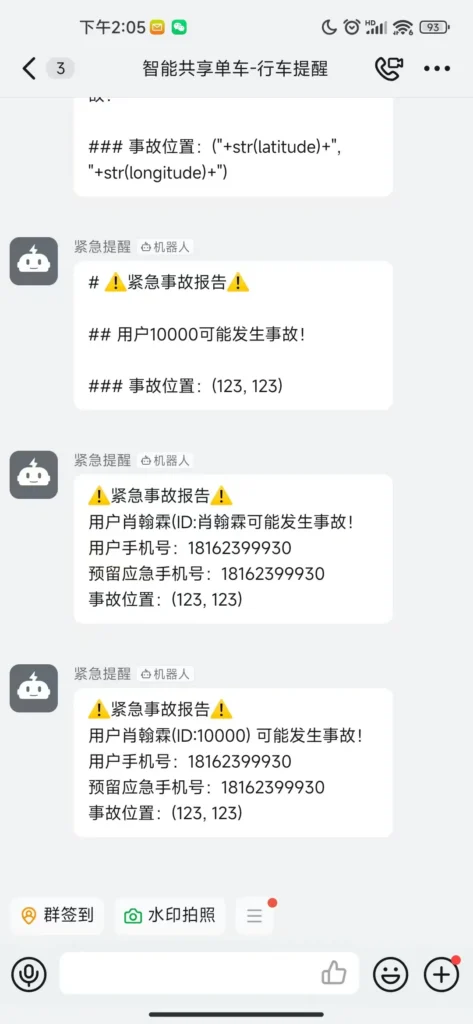
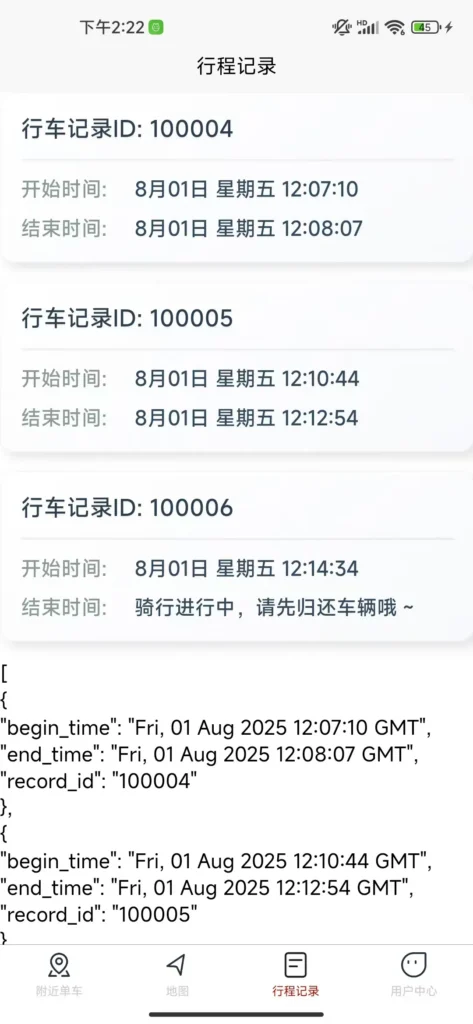
    <summary>一套覆盖用户APP、智能车锁、管理后台的完整共享单车解决方案，技术栈全面，实测抗压 89.7 次/秒 项目缘起 为了参加2025全国青少年信息素养大赛总决赛，我们按照给定题目要求完成了基本开关锁功能，但为了更贴近生活、做成完整成熟的产品，我们开发了更多分支及创新功能，包括但不限于： GPS定位、事故检测报警、车辆故障上报、车辆数据集群管理、后台管理大屏、以用</summary>
    <title>[项目] 一套完整的智能共享单车系统</title>
    <updated>2026-08-27T09:22:59.000Z</updated>
  </entry>
  <entry>
    <author>
      <name>Kazuki</name>
    </author>
    <category term="项目总览" scheme="https://www.ycxhl.top/categories/projects/"/>
    <content>
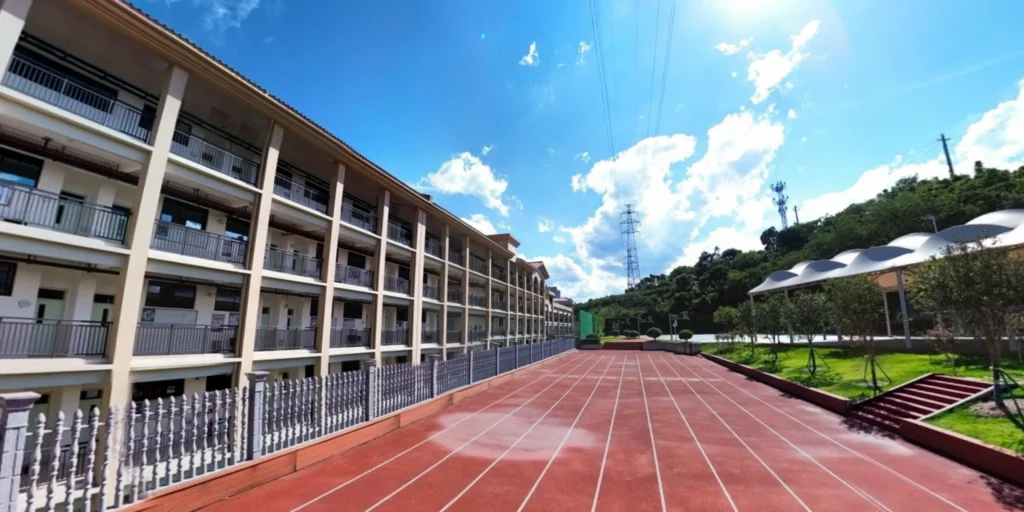
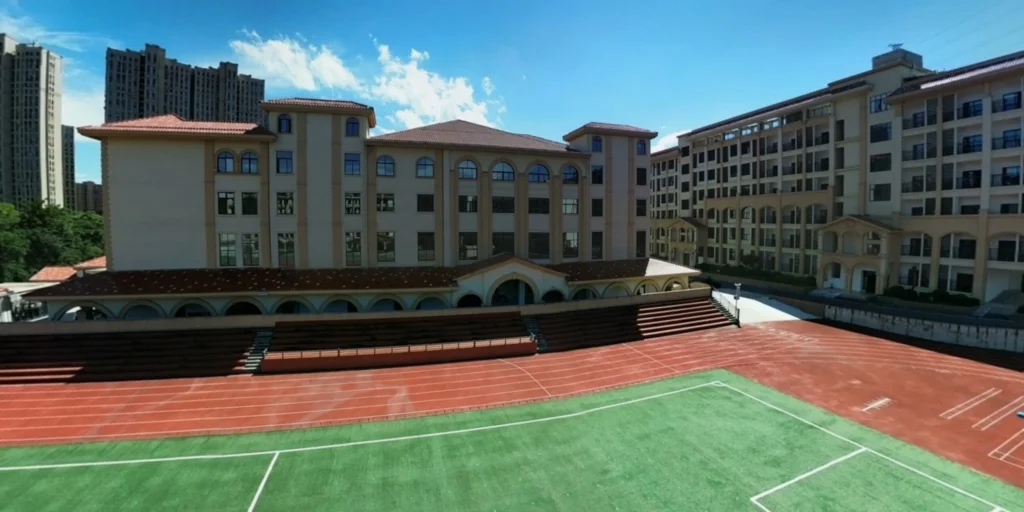
      <![CDATA[<p>网站链接：<a href="https://jdf.ycxhl.top/">点击此处进入金初校园</a></p><p>金初校园一览：（高清图片，若未加载出来请稍作等待）</p><figure class="wp-block-image size-large"><img src="/wp-content/uploads/2026/08/后山操场-1024x512.webp" alt="" class="wp-image-33"/></figure><figure class="wp-block-image size-large"><img src="/wp-content/uploads/2026/08/操场-1024x512.webp" alt="" class="wp-image-32"/></figure><figure class="wp-block-image size-large"><img src="/wp-content/uploads/2026/08/教学楼-1024x512.webp" alt="" class="wp-image-35"/></figure><p>更多超高清图片与4K视频欢迎与我<a href="/%E5%85%B3%E4%BA%8E/">联系</a>，此处由于网站承载力有限故不放出。</p>]]>
    </content>
    <id>https://www.ycxhl.top/archives/16/</id>
    <link href="https://www.ycxhl.top/archives/16/"/>
    <published>2024-07-21T09:37:22.000Z</published>
    <summary>网站链接： 点击此处进入金初校园 金初校园一览：（高清图片，若未加载出来请稍作等待） 更多超高清图片与4K视频欢迎与我 联系 ，此处由于网站承载力有限故不放出。</summary>
    <title>[摄影] 云上探校 - 沉浸式环游金初校园</title>
    <updated>2026-08-23T03:27:31.000Z</updated>
  </entry>
  <entry>
    <author>
      <name>Kazuki</name>
    </author>
    <category term="项目总览" scheme="https://www.ycxhl.top/categories/projects/"/>
    <content>
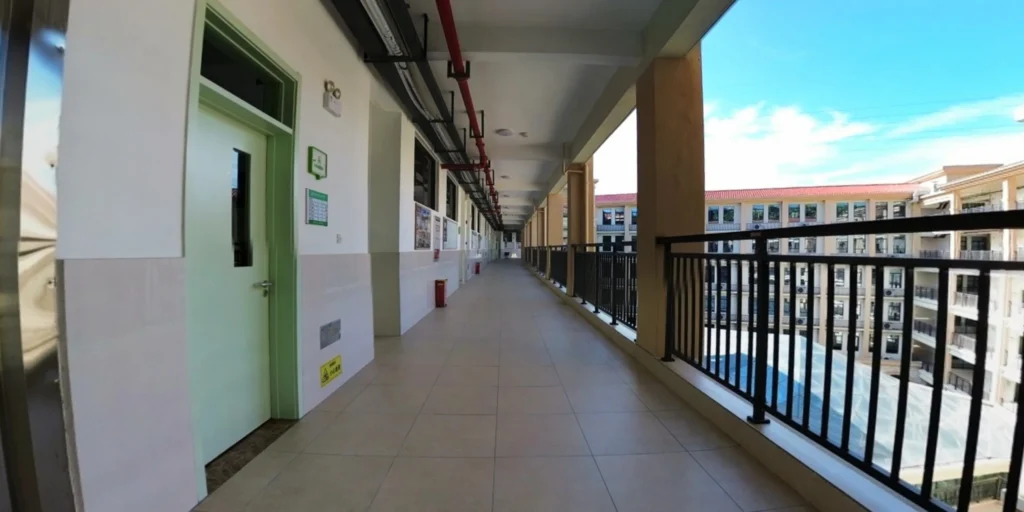
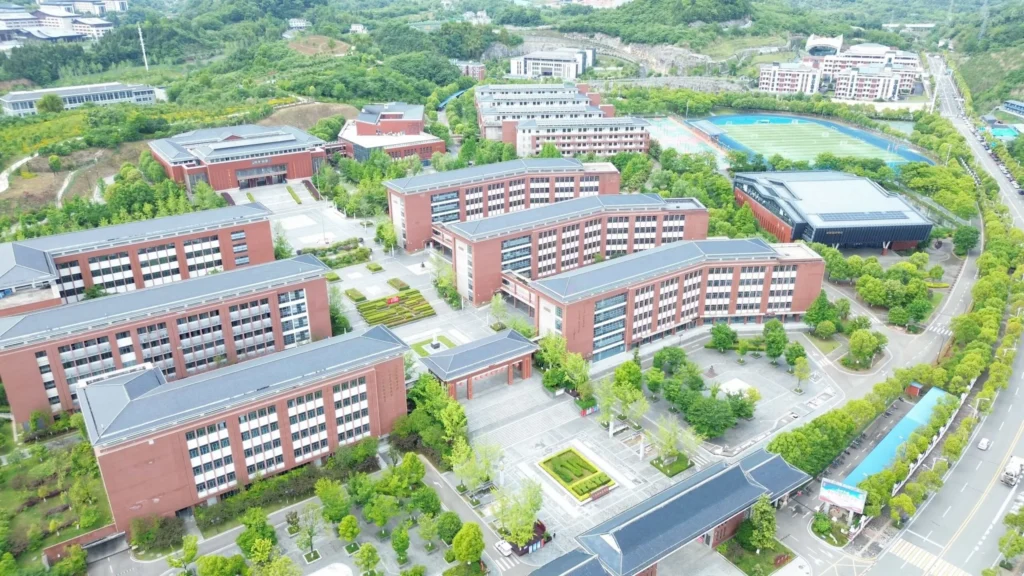
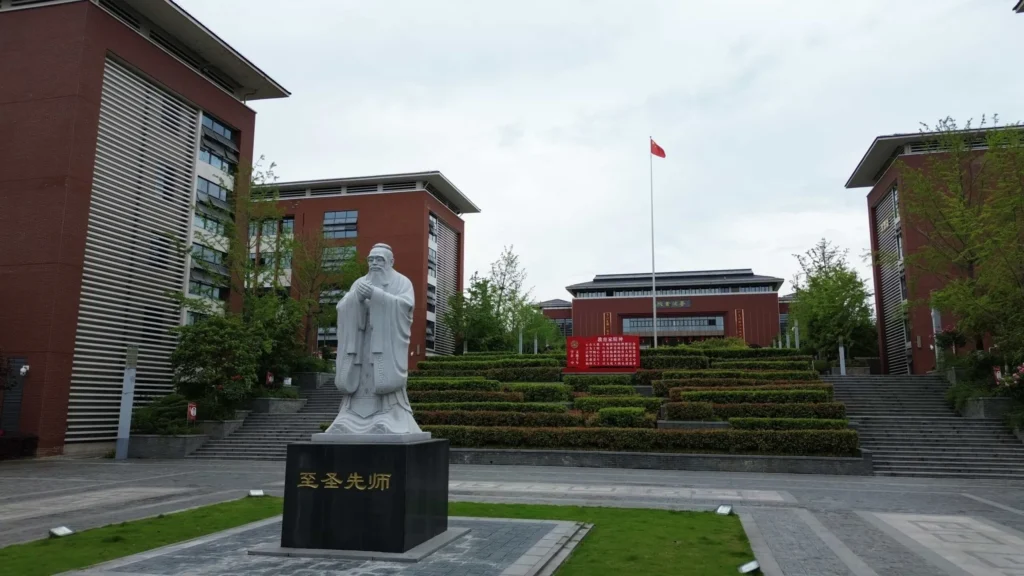
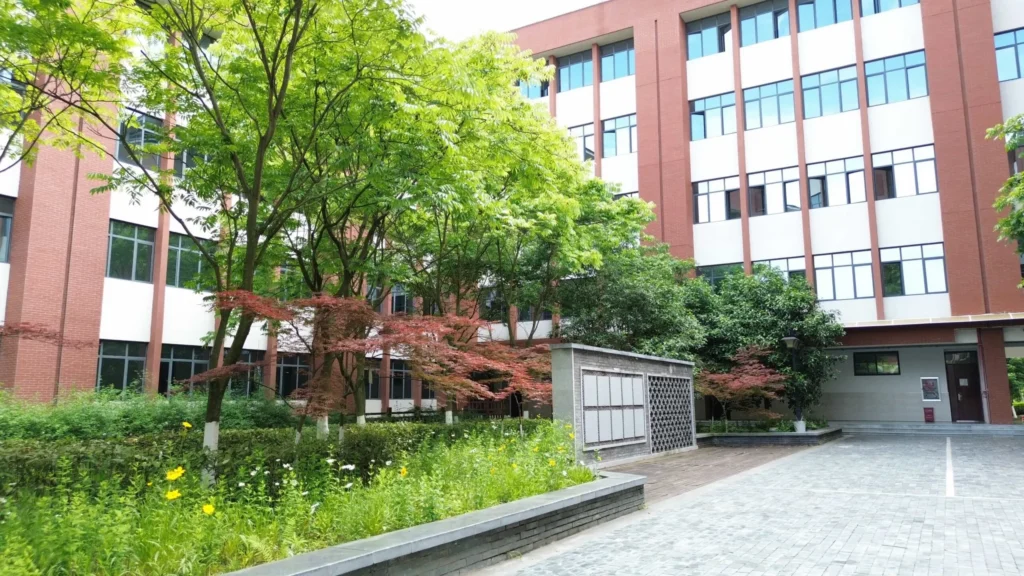
      <![CDATA[<h3 class="wp-block-heading" id="网站链接-点击此处进入一中校园">网站链接：<a href="https://ycyz.ycxhl.top/">点击此处进入一中校园</a></h3><p>一中校园一览：（高清图片，若未加载出来请稍作等待）</p><figure class="wp-block-image size-large"><img src="/wp-content/uploads/2026/08/校园总览-1024x576.webp" alt="" class="wp-image-29"/></figure><figure class="wp-block-image size-large"><img src="/wp-content/uploads/2026/08/孔子像-1024x576.webp" alt="" class="wp-image-36"/></figure><figure class="wp-block-image size-large"><img src="/wp-content/uploads/2026/08/校园一隅-1024x576.webp" alt="" class="wp-image-37"/></figure><p>更多超高清图片与4K视频欢迎与我<a href="/关于/">联系</a>，此处由于网站承载力有限故不放出。</p>]]>
    </content>
    <id>https://www.ycxhl.top/archives/9/</id>
    <link href="https://www.ycxhl.top/archives/9/"/>
    <published>2024-05-03T09:36:42.000Z</published>
    <summary>网站链接： 点击此处进入一中校园 一中校园一览：（高清图片，若未加载出来请稍作等待） 更多超高清图片与4K视频欢迎与我 联系 ，此处由于网站承载力有限故不放出。</summary>
    <title>[摄影] 云上探校 - 沉浸式环游一中校园</title>
    <updated>2026-08-23T03:27:27.000Z</updated>
  </entry>
  <entry>
    <author>
      <name>Kazuki</name>
    </author>
    <category term="日常折腾" scheme="https://www.ycxhl.top/categories/attempts/"/>
    <content>
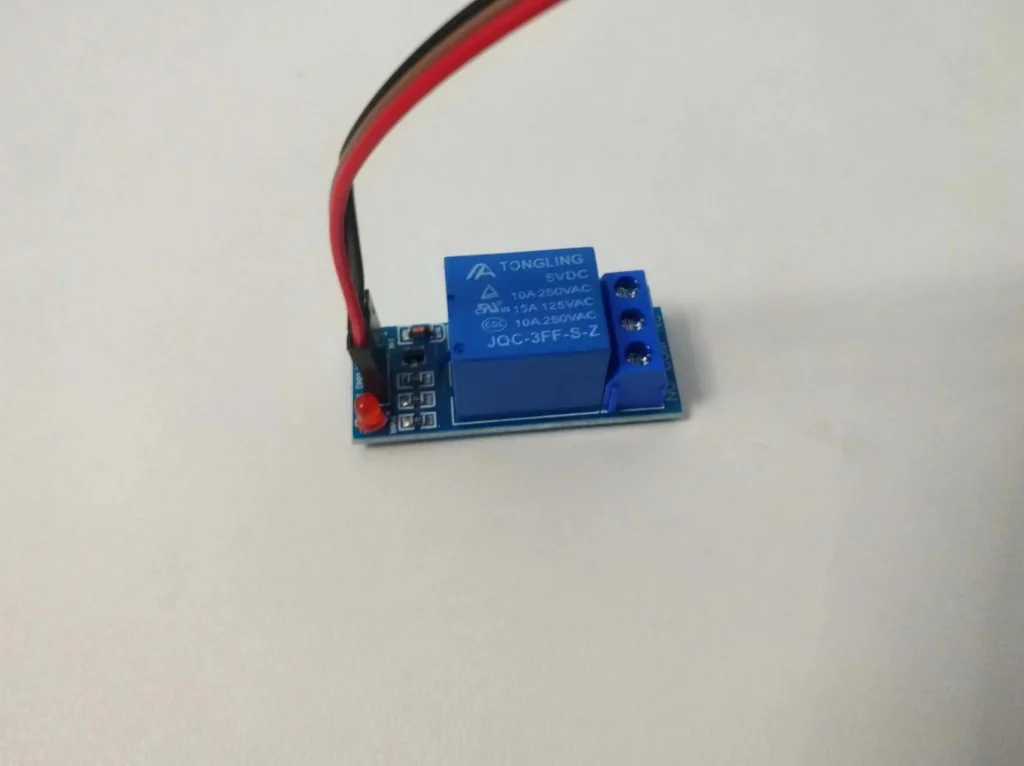
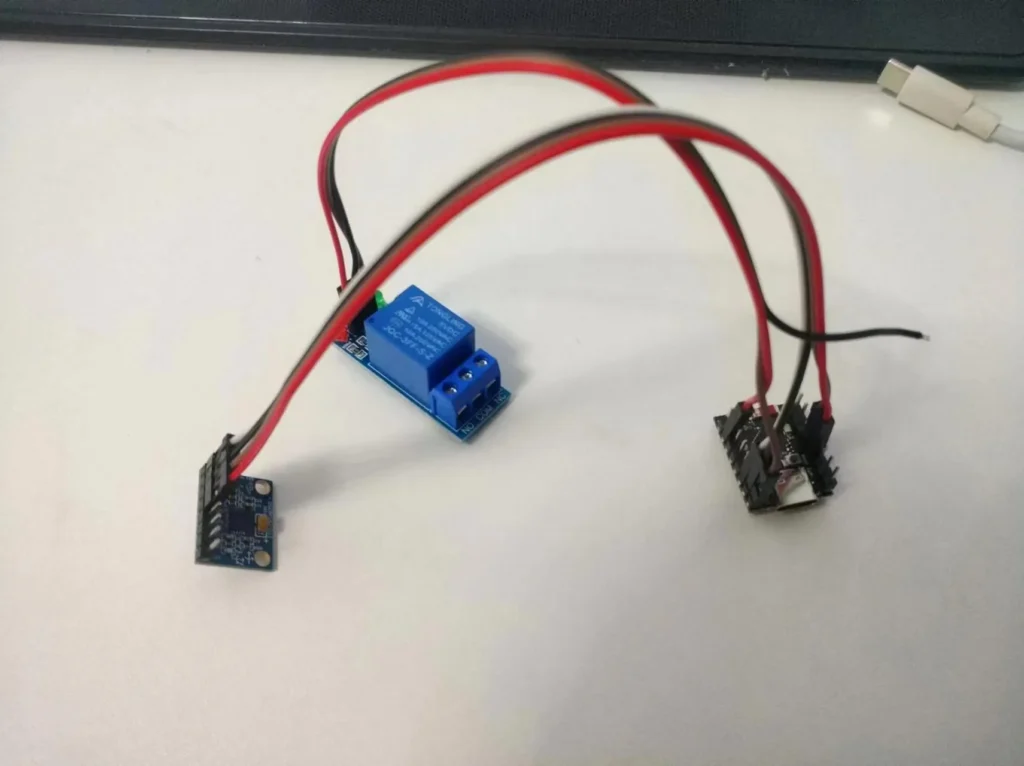
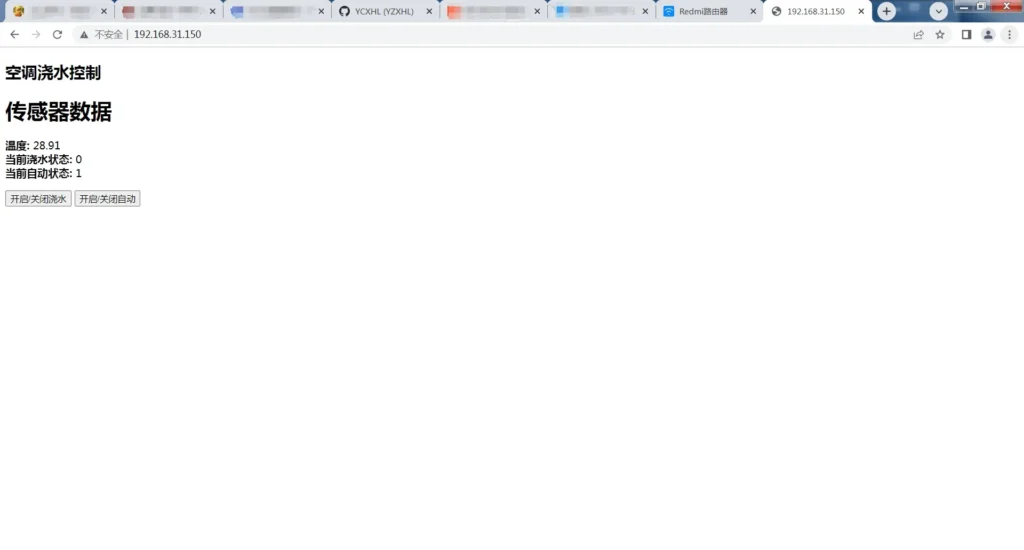
      <![CDATA[<h2 class="wp-block-heading" id="项目亮点">项目亮点</h2><ul class="wp-block-list"><li>[x] <strong>网页操控</strong>：访问设备 IP 即可实时查看温度与自动化状态</li><li>[x] <strong>手动/自动双模式</strong>：通过网页随时开关浇水（手动模式会临时退出自动化，避免浪费水）</li><li>[x] <strong>智能温控</strong>：自动模式下，温度 ≥30℃ 自动开水，&lt;30℃ 自动停水</li><li>[ ] 网页暂未添加 CSS，仅做功能演示，可根据需要自行美化</li></ul><hr class="wp-block-separator has-alpha-channel-opacity"/><h2 class="wp-block-heading" id="起因-空调罢工-问题出在外机">起因：空调罢工，问题出在外机</h2><p>2024 年湖北的夏天格外难熬，家里空调制冷效果奇差，基本形同虚设。<br>一番折腾后，通过 <del>控制变量法</del> 逐项排查，最终锁定真凶——<strong>外机背板散热不畅</strong>（被柜板挡住，热量排不出去）。</p><p>临时想到的解决方案简单粗暴：<strong>用水泵朝外机喷水，强制降温</strong>。</p><p>TB 采购水泵、继电器等模块，接通电源，能跑起来，第一步成功！</p><figure class="wp-block-image size-large"><img src="/wp-content/uploads/2026/08/继电器-1024x766.webp" alt="" class="wp-image-34"/></figure><hr class="wp-block-separator has-alpha-channel-opacity"/><h2 class="wp-block-heading" id="新问题-一直喷水太浪费了">新问题：一直喷水太浪费了</h2><p>手动开关不仅麻烦，人不在家时要么干烧要么浪费水。<br>我开始思考如何让系统<strong>根据温度自动启停</strong>。</p><p>忽然想起去年做火箭姿态矫正时留下的 <strong>MPU6050 六轴传感器</strong>，它内部集成了一颗 NTC 温度模块。<br>虽然原本是用来检测芯片温度的，但 MPU6050 自身发热极小，完全可以近似看作环境温度。<br>于是把它从火箭上“拆借”过来，搭配 <strong>ESP32-C3</strong> 实现温控。</p><hr class="wp-block-separator has-alpha-channel-opacity"/><h2 class="wp-block-heading" id="硬件接线">硬件接线</h2><p>MPU6050 与 ESP32-C3 的接线非常简单（左：MPU6050，右：ESP32-C3）：</p><figure class="wp-block-table"><table class="has-fixed-layout"><thead><tr><th>MPU6050</th><th>ESP32-C3</th></tr></thead><tbody><tr><td>VCC</td><td>3V3</td></tr><tr><td>GND</td><td>GND</td></tr><tr><td>SDA</td><td>P8 (SDA)</td></tr><tr><td>SCL</td><td>P9 (SCL)</td></tr></tbody></table></figure><figure class="wp-block-image size-large"><img src="/wp-content/uploads/2026/08/硬件接线-1024x766.webp" alt="" class="wp-image-30"/></figure><hr class="wp-block-separator has-alpha-channel-opacity"/><h2 class="wp-block-heading" id="软件设计">软件设计</h2><p>开发环境：<strong>Arduino IDE</strong><br>核心思路：ESP32-C3 启动一个轻量 Web 服务器，手机或电脑连上后即可看到实时温度与浇水状态，并可通过按钮手动控制或开启自动化。</p><p><strong>主要功能：</strong></p><ul class="wp-block-list"><li>访问根路径 <code>/</code> 返回控制页面</li><li><code>/dht</code> 接口返回传感器数据（实时温度、浇水状态、自动状态）</li><li><code>/set</code> 接口切换浇水开关（同时关闭自动模式）</li><li><code>/auto</code> 接口切换自动模式</li><li>自动化逻辑：温度 ≥30℃ 开水，&lt;30℃ 停水</li></ul><p>以下为完整代码：</p><pre class="wp-block-code"><code>#include &lt;Adafruit_MPU6050.h&gt;#include &lt;Adafruit_Sensor.h&gt;#include &lt;WiFi.h&gt;#include &lt;ESPAsyncWebServer.h&gt;AsyncWebServer server(80);   // 端口80，可直接通过IP访问// 网页 HTML（存储于 Flash）const char index_html&#91;] PROGMEM = R"rawliteral(&lt;!DOCTYPE HTML&gt;&lt;html&gt;&lt;head&gt;    &lt;meta charset="utf-8"&gt;    &lt;title&gt;空调浇水控制&lt;/title&gt;&lt;/head&gt;&lt;body&gt;    &lt;h2&gt;空调浇水控制&lt;/h2&gt;    &lt;div id="dht"&gt;&lt;/div&gt;    &lt;button onclick="set()"&gt;开启/关闭浇水&lt;/button&gt;    &lt;button onclick="autoset()"&gt;开启/关闭自动&lt;/button&gt;&lt;/body&gt;&lt;script&gt;    function set() &#123;        var xhr = new XMLHttpRequest();        xhr.open("GET", "/set?value=ESP32", true);        xhr.send();    &#125;    function autoset() &#123;        var xhr = new XMLHttpRequest();        xhr.open("GET", "/auto?value=ESP32", true);        xhr.send();    &#125;    // 每秒更新一次数据    setInterval(function () &#123;        var xhttp = new XMLHttpRequest();        xhttp.onreadystatechange = function () &#123;            if (this.readyState == 4 &amp;&amp; this.status == 200) &#123;                document.getElementById("dht").innerHTML = this.responseText;            &#125;        &#125;;        xhttp.open("GET", "/dht", true);        xhttp.send();    &#125;, 1000);&lt;/script&gt;&lt;/html&gt;)rawliteral";Adafruit_MPU6050 mpu;#define MPU6050_INTERVAL 100       // 传感器读取间隔（毫秒）unsigned long mpu6050Times = 0;float mpu6050Temp = 0;float xAcceleration, yAcceleration, zAcceleration;float xAccele, yAccele, zAccele;float xGyro = 0, yGyro = 0, zGyro = 0;float gravity = 9.8;bool iswater = false;  // 浇水状态bool isauto = true;    // 自动模式默认开启// 构造返回给网页的 HTML 数据String Merge_Data(void) &#123;    String dataBuffer = "&lt;p&gt;";    dataBuffer += "&lt;h1&gt;传感器数据&lt;/h1&gt;";    dataBuffer += "&lt;b&gt;温度: &lt;/b&gt;";    dataBuffer += String(mpu6050Temp, 1) + " ℃";    dataBuffer += "&lt;br /&gt;";    dataBuffer += "&lt;b&gt;当前浇水状态: &lt;/b&gt;";    dataBuffer += iswater ? "开启" : "关闭";    dataBuffer += "&lt;br /&gt;";    dataBuffer += "&lt;b&gt;当前自动状态: &lt;/b&gt;";    dataBuffer += isauto ? "开启" : "关闭";    dataBuffer += "&lt;br /&gt;&lt;/p&gt;";    return dataBuffer;&#125;// 手动切换浇水（同时关闭自动模式）void Config_Callback(AsyncWebServerRequest *request) &#123;    iswater = !iswater;    isauto = false;    request-&gt;send(200, "text/plain", "OK");&#125;// 切换自动模式void Auto_Callback(AsyncWebServerRequest *request) &#123;    isauto = !isauto;    request-&gt;send(200, "text/plain", "OK");&#125;void setup() &#123;    Serial.begin(115200);    // 连接 WiFi（请替换为实际 SSID 和密码）    WiFi.begin("你的WiFi名", "你的WiFi密码");    while (WiFi.status() != WL_CONNECTED) &#123;        delay(500);        Serial.println("正在连接WiFi...");    &#125;    Serial.println("WiFi 连接成功！");    Serial.print("IP 地址: ");    Serial.println(WiFi.localIP());    pinMode(1, OUTPUT);   // GPIO1 控制继电器（水泵）    // 配置 Web 服务器路由    server.on("/", HTTP_GET, &#91;](AsyncWebServerRequest *request) &#123;        request-&gt;send_P(200, "text/html", index_html);    &#125;);    server.on("/dht", HTTP_GET, &#91;](AsyncWebServerRequest *request) &#123;        request-&gt;send_P(200, "text/plain", Merge_Data().c_str());    &#125;);    server.on("/set", HTTP_GET, Config_Callback);    server.on("/auto", HTTP_GET, Auto_Callback);    server.begin();    Serial.println("HTTP 服务器已启动");    // 初始化 MPU6050    if (!mpu.begin()) &#123;        Serial.println("未找到 MPU6050 芯片！");        while (1) &#123; delay(1000); &#125;  // 停止运行    &#125;    mpu.setAccelerometerRange(MPU6050_RANGE_16_G);    mpu.setGyroRange(MPU6050_RANGE_250_DEG);    mpu.setFilterBandwidth(MPU6050_BAND_21_HZ);    Serial.println("MPU6050 初始化成功！");&#125;void loop() &#123;    getMpu6050Data();   // 读取温度及姿态数据    if (isauto) &#123;        // 自动模式：根据温度控制水泵        if (mpu6050Temp &gt;= 30.0) &#123;            digitalWrite(1, HIGH);            iswater = true;        &#125; else &#123;            digitalWrite(1, LOW);            iswater = false;        &#125;    &#125; else &#123;        // 手动模式：直接遵从按钮状态        digitalWrite(1, iswater ? HIGH : LOW);    &#125;&#125;void getMpu6050Data() &#123;    if (millis() - mpu6050Times &gt;= MPU6050_INTERVAL) &#123;        mpu6050Times = millis();        sensors_event_t a, g, temp;        mpu.getEvent(&amp;a, &amp;g, &amp;temp);        mpu6050Temp = temp.temperature;        xAcceleration = a.acceleration.x;        yAcceleration = a.acceleration.y;        zAcceleration = a.acceleration.z;        xAccele = xAcceleration / gravity;   // 转换为 g 为单位        yAccele = yAcceleration / gravity;        zAccele = zAcceleration / gravity;        xGyro = g.gyro.x;        yGyro = g.gyro.y;        zGyro = g.gyro.z;        // 串口输出，便于调试（保留了姿态数据，方便后续扩展）        Serial.print("温度: "); Serial.print(mpu6050Temp);        Serial.print(" , x加速: "); Serial.print(xAccele);        Serial.print(" , y加速: "); Serial.print(yAccele);        Serial.print(" , z加速: "); Serial.print(zAccele);        Serial.print(" , x角速度: "); Serial.print(xGyro);        Serial.print(" , y角速度: "); Serial.print(yGyro);        Serial.print(" , z角速度: "); Serial.println(zGyro);    &#125;&#125;</code></pre><figure class="wp-block-image size-large"><img src="/wp-content/uploads/2026/08/最终效果-1024x550.webp" alt="" class="wp-image-31"/></figure>]]>
    </content>
    <id>https://www.ycxhl.top/archives/3/</id>
    <link href="https://www.ycxhl.top/archives/3/"/>
    <published>2024-01-30T09:32:28.000Z</published>
    <summary>
      <![CDATA[项目亮点 [x] 网页操控 ：访问设备 IP 即可实时查看温度与自动化状态 [x] 手动/自动双模式 ：通过网页随时开关浇水（手动模式会临时退出自动化，避免浪费水） [x] 智能温控 ：自动模式下，温度 ≥30℃ 自动开水，<30℃ 自动停水 [ ] 网页暂未添加 CSS，仅做功能演示，可根据需要自行美化 起因：空调罢工，问题出在外机 2024 年湖北的夏天]]>
    </summary>
    <title>[业余] ESP32 智能喷水降温系统</title>
    <updated>2026-08-23T03:27:37.000Z</updated>
  </entry>
</feed>